Does RockYourPhone Really Rock?
September 23, 2009

 The Software
You can download the desktop client for either Mac or PC, but you have to register for a free account with RockYourPhone first. The account will be used for all your future purchases, and works like your iTunes account, by saving all your purchase data in case you need to re-download an app later.
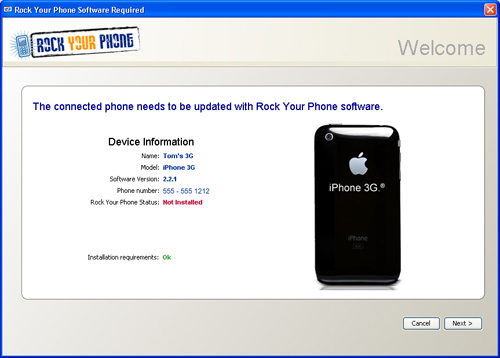
After downloading the desktop client you can view and purchase any of the apps available in the RockYourPhone store. To soft-unlock your phone and install RockYourPhone's version of Cydia, Rock.app, simply plug your phone into the computer via the USB cable and follow the prompts. The software will walk you through each step of the jailbreaking process which takes about 10-15 minutes. The desktop client even has an iPhone recovery tool, just in case something goes wrong.
The Software
You can download the desktop client for either Mac or PC, but you have to register for a free account with RockYourPhone first. The account will be used for all your future purchases, and works like your iTunes account, by saving all your purchase data in case you need to re-download an app later.
After downloading the desktop client you can view and purchase any of the apps available in the RockYourPhone store. To soft-unlock your phone and install RockYourPhone's version of Cydia, Rock.app, simply plug your phone into the computer via the USB cable and follow the prompts. The software will walk you through each step of the jailbreaking process which takes about 10-15 minutes. The desktop client even has an iPhone recovery tool, just in case something goes wrong.
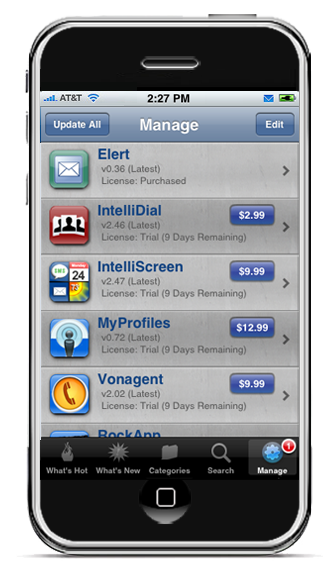 Once you have Rock.app installed on you device you can then use it to purchase, install, or uninstall any of the RockYourPhone apps that you like. But that's not all, Rock.app's recent update to 2.0 adds the ability to install any Cydia repositories and it lists all default Cydia sources automatically. So basically, Rock.app 2.0 is a fully featured Cydia replacement and, according to speed tests posted on the app, its faster than both Cydia and Icy.
The Apps
Now comes the fun part, the RockYourPhone Apps! First of all, you should know that all the apps in the RYP appstore can be used for a 10 day trial before you decide to purchase these, somewhat expensive, apps. Out of the 16 apps currently in the store I am only going to introduce a few of (what I feel are) the most useful apps.
Once you have Rock.app installed on you device you can then use it to purchase, install, or uninstall any of the RockYourPhone apps that you like. But that's not all, Rock.app's recent update to 2.0 adds the ability to install any Cydia repositories and it lists all default Cydia sources automatically. So basically, Rock.app 2.0 is a fully featured Cydia replacement and, according to speed tests posted on the app, its faster than both Cydia and Icy.
The Apps
Now comes the fun part, the RockYourPhone Apps! First of all, you should know that all the apps in the RYP appstore can be used for a 10 day trial before you decide to purchase these, somewhat expensive, apps. Out of the 16 apps currently in the store I am only going to introduce a few of (what I feel are) the most useful apps.
 First is Inspell $3.99, which is simply an inline spell check that underlines misspelled words typed on the iPhone and adds a correction button into the copy/paste menu. It also has the ability to add words to the dictionary so they won't be marked in the future.
 MyWi $9.99, basically turns your iPhone into a Wifi hotspot that you can connect a laptop to with 40 and 104 bit WEP encryption. Also has the ability to tether via USB or Bluetooth.
 AnyRing $3.99, is my personal favorite. This app lets you take any song on your iPhone or iPod Touch and turn it into a ringtone. You can choose your song, listen to it, choose the starting and ending point of the ringtone, and then preview and set your ringtone with no audio conversion required. Now, if you are into having a lot of custom ringtones that seems like a great deal when it costs $0.99 per ringtone in iTunes.
 Tlert on sale for $4.99, is another fantastic app. This one is great for those of you who are constantly texting people, I'm sure that gets annoying when doing other tasks on the iPhone. Tlert allows you to view and reply to your texts within any app without having to close the app your using. When received, new texts will simply display at the top of your screen, you can then either choose to close the message or tap on it to reply. Tlert also gives you the ability to reply within any app in either portrait or landscape mode, pretty sweet if you ask me.
 Elert $0.99, Is basically like the Appstore app, PushMail without having to forward all your mail to another server. Elert simply shows you a little summary of any new emails within any app with the ability to close the notification or open the mail.app to reply.
 MyProfiles on sale for $6.99, is another wow! app that will change your phone's settings and call alerts based on time of day or location. Say you don't want the ringer on while your at work, MyProfiles can automatically turn the phone on vibrate depending on your hours of work or GPS location. Maybe you hate being awoken in the middle of the night by calls or texts but you don't want to miss an important email from your boss. With this app you can choose to only be alerted by specific contacts so you can be well rested and not worry about missing important calls.

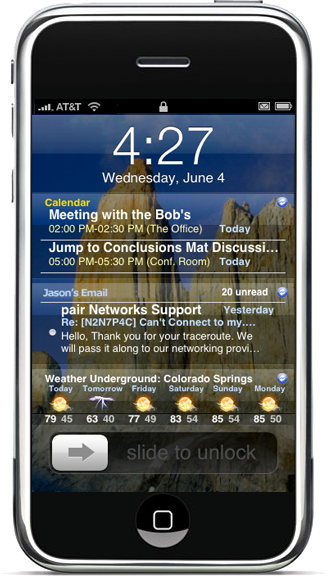 Intelliscreen $9.99, another one of my favorites, puts all your important information right on the lock screen. You can choose to display your upcoming calendar, weather, news, sports scores, email, texts, or any combination of them right up front. What I like about it most of all is its extensive customization ability. You can change the size of each display area, how many weeks of calendar to display, or the number of recent emails and texts to display. You can choose between tons of preloaded news sources or choose your own rss feed to display. And because the app only shows a few lines of your texts or emails, you can swipe to instantly view the whole message without leaving the lock screen. Additionally, Intelliscreen will display icons on the status bar for new texts, emails, and missed calls and it will repeat the alerts for these as well.
The Breakdown
This new way of looking at jailbreaking and a (sans-Apple) appstore has many benefits. First of all, the desktop client makes jailbreaking much easier than before and possibly more attractive to those of us who aren't quite as tech-savvy.
Also, for those of you who already do jailbreak, the added ability to add Cydia repositories to Rock.app now makes it a fully featured replacement for Cydia, and it's faster. Lastly, RockYourPhone's ability to break out of Apple's "shell" takes the idea of iPhone apps to the next level. The apps offered by RockYourPhone aren't like any apps available anywhere, jailbreak or not. Although some Cydia apps do come close to one or two of the Rock apps, they're not nearly as well made and easy to use.
On the downside, RockYourPhone software does not yet support the 3.1 firmware. If you have already updated to 3.1 you can always downgrade your 2G or 3G to the 3.0 or 3.0.1 using this method. But Apple stopped signing the firmware for the 3GS so only certain people can downgrade it using this special method.
The other downside is that there is always some risk with jailbreaking if you don't know what you are doing. If you do jailbreak your phone and are worried that your might void your warranty, don't stress, you can always restore your device in iTunes and return it to its original state.
Lastly, because many of the apps from RockYourPhone do run in the background they take up some of the phone's memory. This can make the iPhone 2G and 3G run a little bit slower over time but is barely noticeable on the 3GS.
Overall, I feel that RockYourPhone's desktop software, new Rock Appstore, and their iPhone apps are all extremely useful additions to any iPhone. I have been using the software for awhile now and enjoy many of the apps. So let us know, would you use RockYourPhone to jailbreak your iPhone, replace Cydia, or even buy some of their useful apps?
Intelliscreen $9.99, another one of my favorites, puts all your important information right on the lock screen. You can choose to display your upcoming calendar, weather, news, sports scores, email, texts, or any combination of them right up front. What I like about it most of all is its extensive customization ability. You can change the size of each display area, how many weeks of calendar to display, or the number of recent emails and texts to display. You can choose between tons of preloaded news sources or choose your own rss feed to display. And because the app only shows a few lines of your texts or emails, you can swipe to instantly view the whole message without leaving the lock screen. Additionally, Intelliscreen will display icons on the status bar for new texts, emails, and missed calls and it will repeat the alerts for these as well.
The Breakdown
This new way of looking at jailbreaking and a (sans-Apple) appstore has many benefits. First of all, the desktop client makes jailbreaking much easier than before and possibly more attractive to those of us who aren't quite as tech-savvy.
Also, for those of you who already do jailbreak, the added ability to add Cydia repositories to Rock.app now makes it a fully featured replacement for Cydia, and it's faster. Lastly, RockYourPhone's ability to break out of Apple's "shell" takes the idea of iPhone apps to the next level. The apps offered by RockYourPhone aren't like any apps available anywhere, jailbreak or not. Although some Cydia apps do come close to one or two of the Rock apps, they're not nearly as well made and easy to use.
On the downside, RockYourPhone software does not yet support the 3.1 firmware. If you have already updated to 3.1 you can always downgrade your 2G or 3G to the 3.0 or 3.0.1 using this method. But Apple stopped signing the firmware for the 3GS so only certain people can downgrade it using this special method.
The other downside is that there is always some risk with jailbreaking if you don't know what you are doing. If you do jailbreak your phone and are worried that your might void your warranty, don't stress, you can always restore your device in iTunes and return it to its original state.
Lastly, because many of the apps from RockYourPhone do run in the background they take up some of the phone's memory. This can make the iPhone 2G and 3G run a little bit slower over time but is barely noticeable on the 3GS.
Overall, I feel that RockYourPhone's desktop software, new Rock Appstore, and their iPhone apps are all extremely useful additions to any iPhone. I have been using the software for awhile now and enjoy many of the apps. So let us know, would you use RockYourPhone to jailbreak your iPhone, replace Cydia, or even buy some of their useful apps?

