Step Up To The Plate And Swing For The Fences With Flick Baseball Pro
May 6, 2010

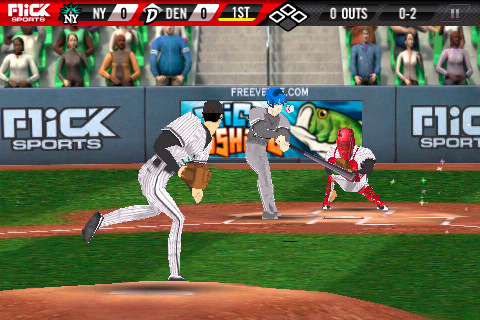 Hitting in Flick Baseball Pro is identical to Homerun Battle 3D's mechanic. Simply tilt and turn your device to get the reticule directly over the ball when it is pitched, and tap to swing at the correct time. Players will run automatically, and you can tap on a base to advance the player further if you wish.
Most of the fielding is done automatically, but once your defensive player has the ball in-hand you can tap on a base to throw the ball. However, fly balls are the only hit that require your immediate attention. Once the ball is in there air, gloves will appear on the screen mini game-style, and you must tap when they overlap in order to catch it.
In Flick Baseball Pro you are able to choose from 34 teams, or create your very own by customizing every part of your player and team. You can choose to play three to nine inning games, and up to 165 game seasons. If you run out of time you can choose to simulate a portion of the game or even entire games. Flick Baseball Pro also features the ability to share stats via Postman, and Plus+integration for awards and global leaderboards.
Flick Baseball Pro is now available in the App Store for the introductory price of $2.99. Apparently Freeverse has already submitted a free ad-based version of the game that will retain core gameplay elements but will leave out the extras like team customization and season mode. So if you can't decide immediately whether or not to give it a try, just wait until the free version is released.
Hitting in Flick Baseball Pro is identical to Homerun Battle 3D's mechanic. Simply tilt and turn your device to get the reticule directly over the ball when it is pitched, and tap to swing at the correct time. Players will run automatically, and you can tap on a base to advance the player further if you wish.
Most of the fielding is done automatically, but once your defensive player has the ball in-hand you can tap on a base to throw the ball. However, fly balls are the only hit that require your immediate attention. Once the ball is in there air, gloves will appear on the screen mini game-style, and you must tap when they overlap in order to catch it.
In Flick Baseball Pro you are able to choose from 34 teams, or create your very own by customizing every part of your player and team. You can choose to play three to nine inning games, and up to 165 game seasons. If you run out of time you can choose to simulate a portion of the game or even entire games. Flick Baseball Pro also features the ability to share stats via Postman, and Plus+integration for awards and global leaderboards.
Flick Baseball Pro is now available in the App Store for the introductory price of $2.99. Apparently Freeverse has already submitted a free ad-based version of the game that will retain core gameplay elements but will leave out the extras like team customization and season mode. So if you can't decide immediately whether or not to give it a try, just wait until the free version is released.