Review: Read More - Unleash the Bookworm Within
by Robb Lewis
June 4, 2010
Overview
If you read a lot of books you know how difficult it can be to keep track of what you have and haven't read. Read More helps with this problem. Read More lets you create a reading list, save which page you are on, track how long you have been reading for and view a history of past sessions.Features
 - Built in timer
- 5 different colors and styles for books
- Reading list
- Reading summary
- Export reading list to a csv
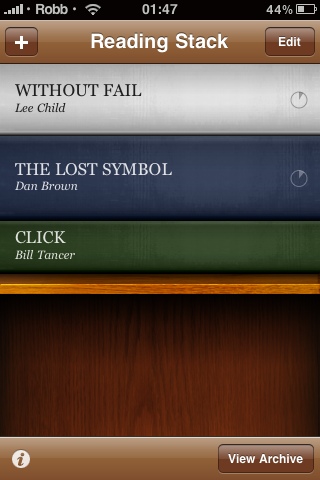
The purpose of Read More is to encourage you to well, read more. So to get started, hit the plus symbol and start adding books that you are currently reading or want to read. Type in the title, author and the amount of pages. You can also choose from five colors and four textures to display the book in your reading list.
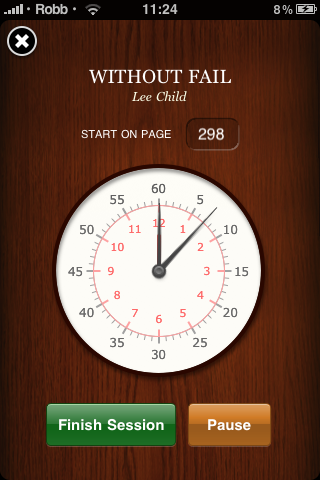
After adding everything you want to read you can edit, rearrange and delete books. When you want to start reading a book, simply select it from the list and press start timer. When you've finished reading, press finish session and select which page you stopped at. Read More will then show you what percentage of the book you have read, how many pages are left as well as estimate when you will finish the book (based on the average reading speed of each session).
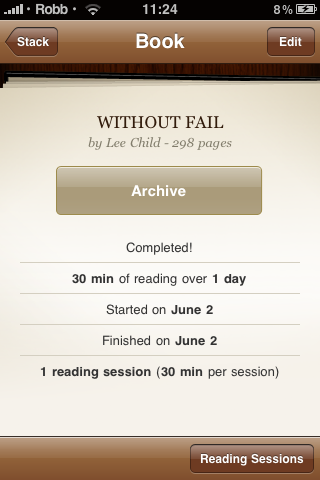
When you have finished reading a book, it is sent to the archive. From the archive you can view every book you have read, as well as export the data to a csv file to open in your spreadsheet program of choice. Simply select the arrow in the bottom left from the archive page and a new email with the file attached will be created.
- Built in timer
- 5 different colors and styles for books
- Reading list
- Reading summary
- Export reading list to a csv
The purpose of Read More is to encourage you to well, read more. So to get started, hit the plus symbol and start adding books that you are currently reading or want to read. Type in the title, author and the amount of pages. You can also choose from five colors and four textures to display the book in your reading list.
After adding everything you want to read you can edit, rearrange and delete books. When you want to start reading a book, simply select it from the list and press start timer. When you've finished reading, press finish session and select which page you stopped at. Read More will then show you what percentage of the book you have read, how many pages are left as well as estimate when you will finish the book (based on the average reading speed of each session).
When you have finished reading a book, it is sent to the archive. From the archive you can view every book you have read, as well as export the data to a csv file to open in your spreadsheet program of choice. Simply select the arrow in the bottom left from the archive page and a new email with the file attached will be created.