You are using an outdated browser. Please
upgrade your browser to improve your experience.

Use this app to find your missing hearing aid

Lost Hearing Aids Finder
by Brain Crunch LLC


What is it about?
Use this app to find your missing hearing aid. By following your instructions you can find both or one of your missing hearing aids.
App Store Description
Use this app to find your missing hearing aid. By following your instructions you can find both or one of your missing hearing aids.
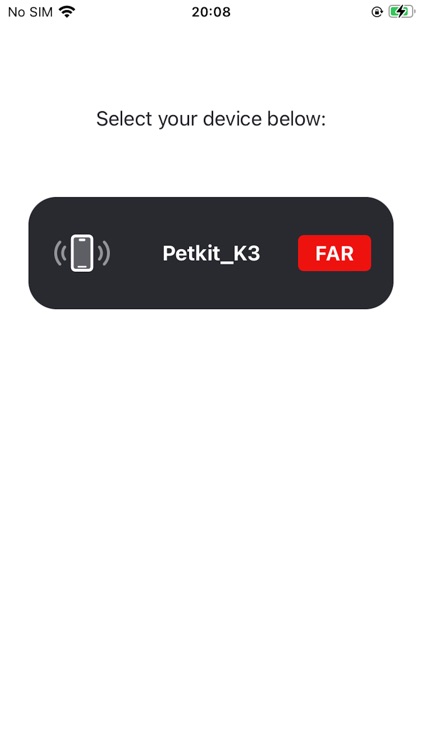
Firstly, start by scanning for your device.
Secondly, see your device and if it is “NEAR” or “FAR" in a device list.
Once you select your device from a list you are provided an opportunity to unlock full functionality. After this point, you must unlock premium functionality.
IN-APP PURCHASE, LIFETIME UNLOCK:
In the premium version there are three tools that further hone in on your missing hearing aid. Check out the premium features below:
BLUETOOTH PROXIMITY DETECTOR:
This uses Bluetooth Low Energy signals to approximate where your lost hearing aid is located.
BLUETOOTH PROXIMITY BEEPING SOUNDS:
The sounds emanate a sense of urgency the closer you get to your lost hearing aid. While searching, you may not be able to look at the screen 100% of the time. This adds some extra feedback. Also, this sound should play through your missing hearing aid. If you cannot hear it, perhaps grandchildren, or pets can hear it for you.
BLUETOOTH PROXIMITY HAPTIC FEEDBACK:
The haptic feedback sends vibrations to your phone. If you are not able to hear the beep sound from your lost hearing aid, this is an extra backup to give you an extra nudge, showing you where your lost hearing aid is by using vibration.
All three finder mechanisms work with the bluetooth connection to your hearing aid. By utilizing all three methods at the same time, surely you will be able to fin your missing device!
The closer you are, the more active beep sound and haptic feedback become; and for the proximity radar, it turns from red to green as you get closer in proximity.
Go save some money by using this app. HAPPY HUNTING!
NOTES:
DISTANCE : In order for the app to work you need to be around 100 meters or less in proximity to the lost device. It is best to “comb” suspected sites where you think that you lost the hearing aid. In some cases, devices may be detectable at over 100 meters.
BATTERY. : Your lost hearing aid(s) must be holding a charge in order for the bluetooth proximity detecting functions to work. With no battery, your missing device is unable to emit a bluetooth signal.
PROPRIETARY BLUETOOTH CONNECTIONS : Warning! There may be cases in which your hearing aid Bluetooth connection may be proprietary. When scanning for your device, if your device is not listed in the found devices list, do not purchase the in-app purchase.
Disclaimer:
AppAdvice does not own this application and only provides images and links contained in the iTunes Search API, to help our users find the best apps to download. If you are the developer of this app and would like your information removed, please send a request to takedown@appadvice.com and your information will be removed.
AppAdvice does not own this application and only provides images and links contained in the iTunes Search API, to help our users find the best apps to download. If you are the developer of this app and would like your information removed, please send a request to takedown@appadvice.com and your information will be removed.
