You are using an outdated browser. Please
upgrade your browser to improve your experience.

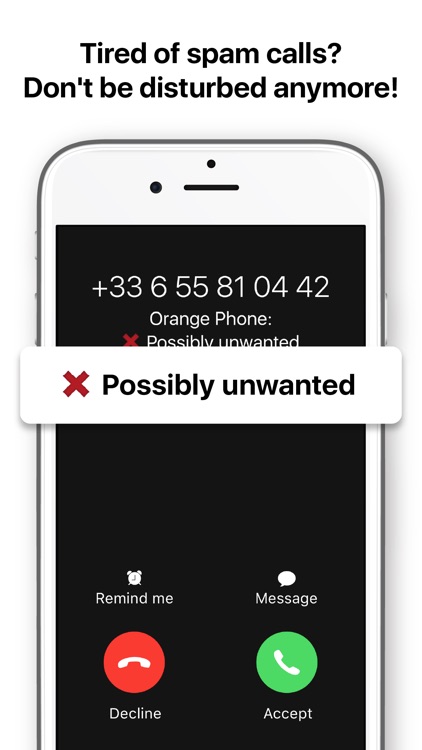
Orange Phone allows you to identify spam calls even before picking up, and to block them

Orange Phone
by Orange


What is it about?
Orange Phone allows you to identify spam calls even before picking up, and to block them. It also allows you to be informed of the prices of calls to premium rate numbers, and much more. It is a free application with no ads.
App Screenshots


App Store Description
Orange Phone allows you to identify spam calls even before picking up, and to block them. It also allows you to be informed of the prices of calls to premium rate numbers, and much more. It is a free application with no ads.
• Identify and block unwanted calls
No more wondering whether or not to answer an unknown call! Orange Phone protects you effectively and allows you to identify unwanted and telemarketing calls even before you pick up.
You can also decide to automatically block numbers that are identified as spam by our user community: so you will no longer receive these calls on your phone at all and you will no longer be disturbed!
Activate the identification of these spam calls from the phone settings in Settings / Phone / Call blocking and identification.
Please note, due to technical constraints, Orange Phone's anti-spam on iOS is based on a database downloaded locally. To remain effectively protected, this database must be updated regularly!
Several tips are important to know in order to enable this update:
o keep the application running in the background (and allow background refreshes) or restart it regularly (closing the application will not save battery)
o install the widget to know the status of anti-spam continuously (https://orangetelephone.zendesk.com/hc/articles/4416727952146)
o use a Reminder to help you restart the application when necessary (in "My settings")
o use a Shortcut to update anti-spam: manually, automatically or via Siri! (https://orangetelephone.zendesk.com/hc/articles/11381392951964)
o take advantage of local notifications which will remind you when to restart the application (if notifications permission is given)
o deactivate power saving mode
All of these tips can be used simultaneously.
• Fight against spam with the community
You can report spam numbers yourself and block them so you won't be disturbed. Your report will be shared with the community to fight more effectively against scams and abusive telemarketing.
• Find out the cost of premium calls
Avoid bad surprises by checking the costs of calling premium numbers before making the call.
• Quickly access emergency numbers
Easily find the list of the most important emergency numbers in the country you are in.
----------------------------------------------------
Orange Phone App respects your privacy:
* We do not use your contact data and the confidentiality of your personal information is guaranteed
* Sending usage data is anonymous and can be deactivated at any time
* Find out more about permissions and data the App uses in the "Trust Badge" menu
* The App is Ad free
* Information about premium numbers is not available in Romania and Moldova.
Any question about the App? Please check our FAQ: https://orangetelephone.zendesk.com/hc/sections/4440590072338
We are always happy to hear from you! Do not hesitate to contact us for any question or suggestion from the menu of your application.
Disclaimer:
AppAdvice does not own this application and only provides images and links contained in the iTunes Search API, to help our users find the best apps to download. If you are the developer of this app and would like your information removed, please send a request to takedown@appadvice.com and your information will be removed.
AppAdvice does not own this application and only provides images and links contained in the iTunes Search API, to help our users find the best apps to download. If you are the developer of this app and would like your information removed, please send a request to takedown@appadvice.com and your information will be removed.
