You are using an outdated browser. Please
upgrade your browser to improve your experience.

PDF Reader Pro is an all-in-one PDF reader & editor, without downloading multiple Apps, you can get all your PDF works done perfectly in PDF Reader Pro, here comes your almighty PDF tool:

PDF Reader - Read PDF Files
by Sanjaykumar Khunt

What is it about?
PDF Reader Pro is an all-in-one PDF reader & editor, without downloading multiple Apps, you can get all your PDF works done perfectly in PDF Reader Pro, here comes your almighty PDF tool:
App Screenshots


App Store Description
PDF Reader Pro is an all-in-one PDF reader & editor, without downloading multiple Apps, you can get all your PDF works done perfectly in PDF Reader Pro, here comes your almighty PDF tool:
1. PDF Editor: Edit PDF text and images easily on the phone
2. PDF Converter: Magically convert PDF to editable Word files
3. PDF Scanner: Scan paper documents to PDF clearly & quickly
4. PDF Signature App: Sign and fill PDF documents, e-signature is legal & secure
5. PDF Formfiller: Fill in a PDF file directly on the phone without printing or faxing
6. Protect PDF privacy, set the password for your PDF documents
7. Read PDF more easily, Black Mode & Reading Mode for your choice
8. Sync with Cloud documents, all PDF files in one place
9. Add annotations, Merge PDF, Compress PDF, etc
All-in-one PDF tool, Maximizing PDF productivity, The most efficient choice for PDF users!
◆ PDF Reader Pro meets all your PDF needs
"Edit, Sign and Fill PDF"
- Real text-editable PDF editor, more than annotating PDF, edit PDF text like Word
- Add, delete or rotate PDF images freely
- E-sign your PDF smoothly, safest & most secure e-signature
- Sign documents anywhere from any device
- Fill in a PDF file directly on the phone
"Protect PDF documents security"
- Protect PDF documents by adding passwords
- Add watermark to PDF documents
- Safest electronic signature
"All your PDF documents in one place"
- Sync with Google Drive, Gmail, OneDrive, Dropbox, handle all pdf files in one place
- Clearly categorized and well-organized PDF documents
"More highlight features"
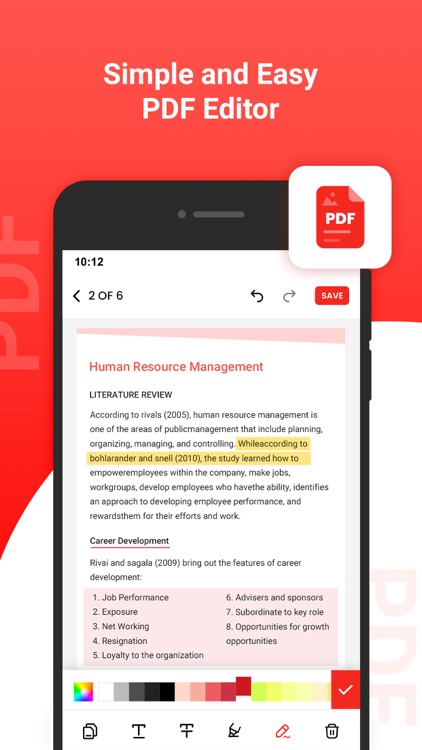
- Annotate, highlight, comment PDF
- Merge multiple PDF documents into one PDF
- Organize PDF pages freely
- Compress PDF files to reduce the file size
- Extract text from PDF and images
"Add text to PDF. Type on a PDF"
- Make sure the 'Text' tool is selected. Click anywhere on the PDF page to add text.
"Change PDF text"
- Select the 'Text' tool in the top toolbar. Click any existing text to start editing. Make text bold or italic, change font size, font family and text color.
"Add image to PDF"
- Click the 'Images' menu and select 'New Image'. Select an image from your computer and then add it to the PDF page. You can drag with your mouse to move it, drag on the corners to resize it.
"Fill out PDF forms"
- Click any form field in the PDF and start typing. Form contains no input fields? Select the 'Text' tool to type text and the 'Forms' tool for checkmarks and radio bullets.
"Add links to PDF and edit existing hyperlinks"
- Add new links to web URLs or pages in the document. Easily edit existing hyperlinks in the PDF.
"Whiteout PDF"
- Cover part of the PDF page with a white rectangle so the contents is no longer visible.
"Add shapes"
- Click the 'Shape' tool to add rectangular or ellipsis shapes to a PDF page. Change border or background fill color.
"Find and replace in PDF"
- Easily find and replace all occurrences of words in a PDF.
"Add form fields to PDF"
- Click on 'Forms' in the top menu and select the type of form input you want to add: Text, Multiline Text, Dropdown, Checkbox, Radio choices.
- Click on the desired form field type and place it on the page. Enter the new field's name and, optionally, the default value.
"Annotate PDF pages"
- Use the PDF annotator to strikethrough and highlight text on PDF pages. Click on 'Annotate', then choose the style and select text on page to apply.
"Save your changes"
- Click the 'Apply changes' button to apply the changes and then 'Download' your edited PDF document.
Get unlimited access to all premium flyers, posters and banners.
Subscribe Monthly PDF Editor Pro at $1.99 and Yearly PDF Editor Pro at $9.99 to use ads free versions of the premium app which can cancel anytime.
• Privacy Policy: https://sites.google.com/view/postart-policy
• Terms of Service: https://sites.google.com/view/postart-termsofuse
Experience the future of PDF editing – Edit Everything!
Disclaimer:
AppAdvice does not own this application and only provides images and links contained in the iTunes Search API, to help our users find the best apps to download. If you are the developer of this app and would like your information removed, please send a request to takedown@appadvice.com and your information will be removed.
AppAdvice does not own this application and only provides images and links contained in the iTunes Search API, to help our users find the best apps to download. If you are the developer of this app and would like your information removed, please send a request to takedown@appadvice.com and your information will be removed.
