You are using an outdated browser. Please
upgrade your browser to improve your experience.

Have you been in the situation when it was necessary to quickly digest an important text information from price tag, billboard, computer screen or just random piece of paper

PixNut
by Nikolay Klimchuk


What is it about?
Have you been in the situation when it was necessary to quickly digest an important text information from price tag, billboard, computer screen or just random piece of paper? I was and that's exactly why I've created this app!
App Screenshots

App Store Description
Have you been in the situation when it was necessary to quickly digest an important text information from price tag, billboard, computer screen or just random piece of paper? I was and that's exactly why I've created this app!
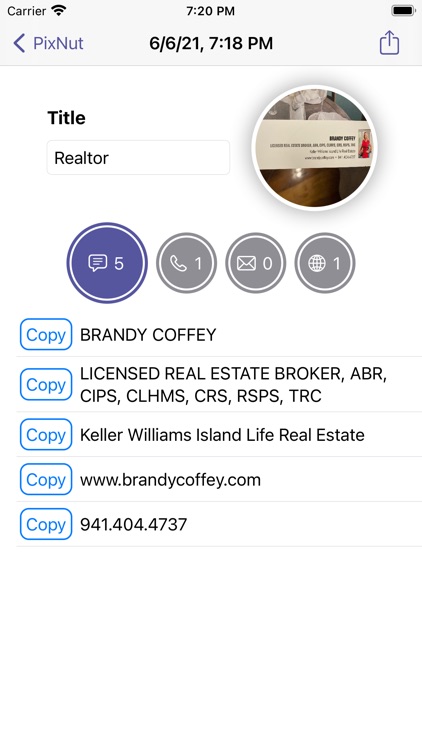
PixNut is capable of extracting text from images received from camera or saved in photo gallery. It can instantly detect phone numbers, email addresses, web links and even QR codes. Shortcuts are available to copy individual line of text to clipboard, call phone number, send emails or open links in external browser. You can also share text with 3rd party apps using standard iOS sharing panel.
It is possible to give a user defined title to each extraction operation. Just don't forget to press Return key on keyboard to save it. Both extracted text and title can be easily searched later on. And of course there is access to original high resolution image.
I can guarantee: you will be surprised how much stuff this app can pull out of an ordinary picture. Pretty often you won't even realize some text was there. It can be small in size and color makes it unreadable in normal circumstances but not for this app!
There are few additional settings available:
* You can save pictures from camera to PixNut album in photo gallery, it is disabled by default
* Vertical viewport allows to reduce vertical area of the image used for text recognition, sometimes it helps to isolate significant area of the image, default is 1:1
* Specifying language may increase quality with large blocks of text
* Minimal length tells the app to ignore lines of text shorter than X characters
ATTENTION: For better text recognition using camera please make sure subject is in focus, well lit and takes most of the view.
Disclaimer:
AppAdvice does not own this application and only provides images and links contained in the iTunes Search API, to help our users find the best apps to download. If you are the developer of this app and would like your information removed, please send a request to takedown@appadvice.com and your information will be removed.
AppAdvice does not own this application and only provides images and links contained in the iTunes Search API, to help our users find the best apps to download. If you are the developer of this app and would like your information removed, please send a request to takedown@appadvice.com and your information will be removed.
