You are using an outdated browser. Please
upgrade your browser to improve your experience.

You liked it, bought it and brought it home

WineGPS
by Al Dynak


What is it about?
You liked it, bought it and brought it home. What happened to it after that? Of course you added it to a Cellar Tracker® location and bin, right? WineGPS quickly searches for your bottle and lets you know where it is.
App Screenshots



App Store Description
You liked it, bought it and brought it home. What happened to it after that? Of course you added it to a Cellar Tracker® location and bin, right? WineGPS quickly searches for your bottle and lets you know where it is.
NO-FRILLS SEARCHING
Searches are case insensitive and understand partial words. Search for wines by producer, vintage, varietal, vineyard, AVA, designation or country. You can search in more than one Location: Cellar, Under The Stairs, Wine Storage Locker, the choice is yours. Sort search results by Available, Vintage, Purchase Date and more.
SHOPPING CART
Build a cart full of the wines you want to drink. Print the cart or import it into a spreadsheet application.
CHARTS
Charts for Purchases, Consumed, Aged by Purchase Date. Heat Map to visualize what wines you have and when they are ready to drink.
GEO LOCATION
World map with pins marking where your wines are from. Tapping a pin displays a map of the appellation and its wines.
AD HOC REPORTS
Design and run custom reports of your cellar. Save and edit reports to get them just right. View the report on your device. Print or import reports using the cloud.
BIN MANAGEMENT
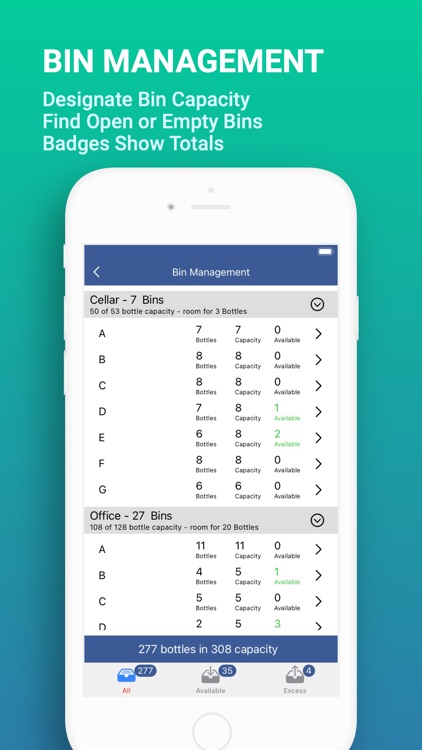
Set the capacity of your bins. This feature compares the capacity and the contents of your bins. Quickly discover where you can add more bottles. Capacity syncs across all your Apple devices using your iCloud account.
TUTORIAL and SETTINGS
Tutorial is always with you as a menu item. Change the language of WineGPS to English, French or Spanish. Bottle identifiers or barcodes are optional. If you don’t use them, you can turn them off. Enable offline mode to use WineGPS when there is no network coverage available.
REQUIREMENTS
You must have a Cellar Tracker® account before you use WineGPS. WineGPS cannot be used to add new wine or relocate wine in your Cellar Tracker® account. WineGPS does remove bottles from your Cellar Tracker® account when you mark them as consumed.
SUPPORT
Please contact us at WineGPSHelp@gmail.com with suggestions and questions.
Disclaimer:
AppAdvice does not own this application and only provides images and links contained in the iTunes Search API, to help our users find the best apps to download. If you are the developer of this app and would like your information removed, please send a request to takedown@appadvice.com and your information will be removed.
AppAdvice does not own this application and only provides images and links contained in the iTunes Search API, to help our users find the best apps to download. If you are the developer of this app and would like your information removed, please send a request to takedown@appadvice.com and your information will be removed.
