You are using an outdated browser. Please
upgrade your browser to improve your experience.
If you've never taken a typing class or learned how-to type on a keyboard, A-to-Z Keyboard lays out the keys in alphabetical order providing an intuitive way to quickly find the next key

A-TO-Z Keyboard
by Chris Tava
What is it about?
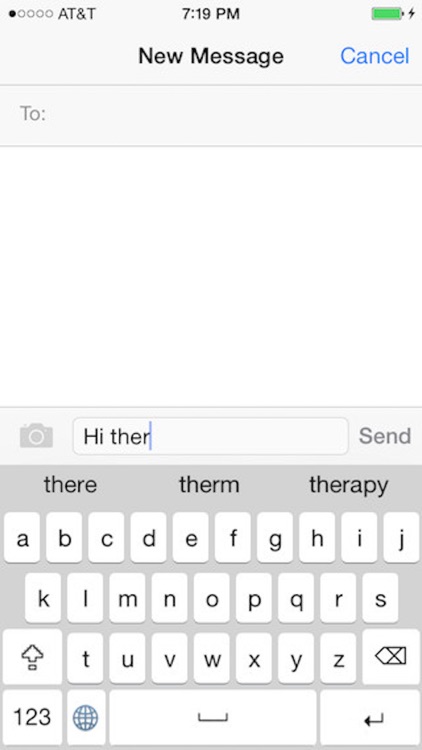
If you've never taken a typing class or learned how-to type on a keyboard, A-to-Z Keyboard lays out the keys in alphabetical order providing an intuitive way to quickly find the next key. Need to quickly type numbers and symbols? No problem. Simply tap on the '123' button to switch to numbers. Also, tap on 'Shift' key to access capital letters and to use additional symbols.
App Store Description
If you've never taken a typing class or learned how-to type on a keyboard, A-to-Z Keyboard lays out the keys in alphabetical order providing an intuitive way to quickly find the next key. Need to quickly type numbers and symbols? No problem. Simply tap on the '123' button to switch to numbers. Also, tap on 'Shift' key to access capital letters and to use additional symbols.
Features:
* Lays out the keys in alphabetical order
* Suggestions to complete words are provided based on typing
* Tap on suggestion for keyboard to remember it for future use
* Pop-ups provide feedback on the key that's pressed
* long press on characters (e,y,u,i,o,a,s,l,z,c,n) for latin and cyrillic characters
* Portrait and landscape orientations supported
* Does not require full access
Keyboard does not have predictive typing or autocorrect.
This keyboard is looking out for your privacy and the security of your information. As such, it does not need full access.
Back story:
The current standard keyboard is known as the Qwerty keyboard, based on the first six letters on the left-side of the upper row of alphabetic characters. It was designed for mechanical typewriters around 1872 by C. Latham Sholes. Letters were arranged to prevent the jamming of mechanical keys, a design which also slows down typing for untrained individuals. Since, mechanical key interference is no longer an issue...perhaps its time for an alternative?
Disclaimer:
AppAdvice does not own this application and only provides images and links contained in the iTunes Search API, to help our users find the best apps to download. If you are the developer of this app and would like your information removed, please send a request to takedown@appadvice.com and your information will be removed.
AppAdvice does not own this application and only provides images and links contained in the iTunes Search API, to help our users find the best apps to download. If you are the developer of this app and would like your information removed, please send a request to takedown@appadvice.com and your information will be removed.
