You are using an outdated browser. Please
upgrade your browser to improve your experience.

Would you like to have an overview of your finances and you are looking for an app

ADhabu 2 M
by Andreas Dietrich


What is it about?
Would you like to have an overview of your finances and you are looking for an app?
App Screenshots


App Store Description
Would you like to have an overview of your finances and you are looking for an app?
You want to manage your finances in categories?
Each category should have a maximum value?
Do you only need one income category or do you have the same income every month?
Then ADhabu 2 is the right app for you!
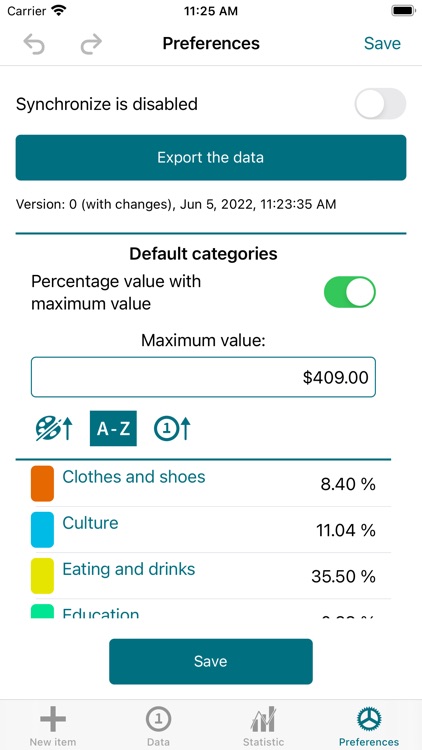
With ADhabu 2 you create first your default categories. You give each default category a name, a color and value. The value can be a currency value or a percentage. That is your decision. If you use percentages, you must also enter one maximum value for all default categories.
After creating the default categories, ADhabu 2 creates categories with the specified values for each new month. Now all you have to do is enter your items.
Each item has a name, a (current) date, a value and NEW in ADhabu 2 a repeat value. So recurring expenses are very easy to enter.
If you have several income categories or changing income, then you better take a look at ADhoke 3.
Features:
- Create as many outgoing categories as you wish
- Specify the outgoing categories by a maximum value per category or with percent values and one amount for all categories
- View the data between a timespan (only full months)
- Create items with a name, a date, a value and a repeating value
- Search for objects
- Export and printing of the visible data to a CSV file
- Export of the app data and import it on an other device
- Graphical statistic for yearly, monthly and daily overview
- Graphical statistic for yearly and monthly difference
Disclaimer:
AppAdvice does not own this application and only provides images and links contained in the iTunes Search API, to help our users find the best apps to download. If you are the developer of this app and would like your information removed, please send a request to takedown@appadvice.com and your information will be removed.
AppAdvice does not own this application and only provides images and links contained in the iTunes Search API, to help our users find the best apps to download. If you are the developer of this app and would like your information removed, please send a request to takedown@appadvice.com and your information will be removed.
