You are using an outdated browser. Please
upgrade your browser to improve your experience.

AI CutoutCraft is a smart image editing tool powered entirely by on-device AI

AI CutoutCraft
by 维 艾


What is it about?
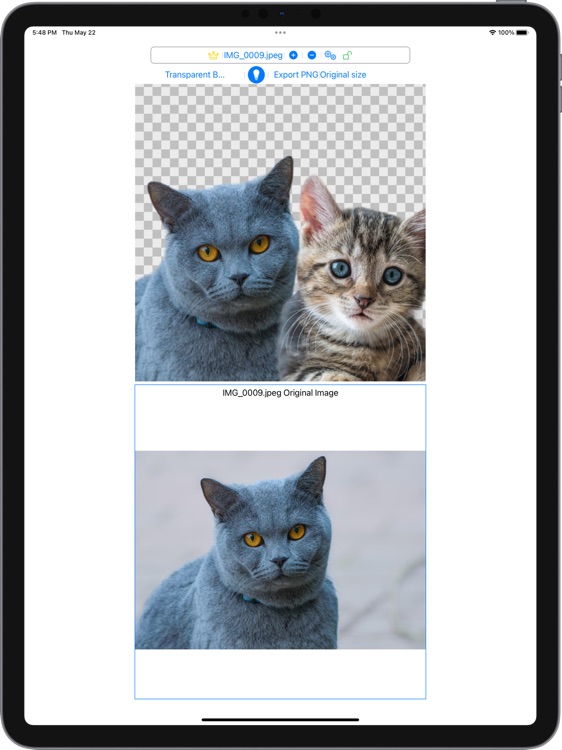
AI CutoutCraft is a smart image editing tool powered entirely by on-device AI. No registration, no uploads. A few taps — remove backgrounds, restyle images, create layouts, and export instantly. Everything works offline, locally. Made for macOS, iPhone, and iPad.
App Screenshots
App Store Description
AI CutoutCraft is a smart image editing tool powered entirely by on-device AI. No registration, no uploads. A few taps — remove backgrounds, restyle images, create layouts, and export instantly. Everything works offline, locally. Made for macOS, iPhone, and iPad.
Key Features
• One-Tap AI Cutout: Remove backgrounds instantly using local CoreML models. Automatically detects the subject in any image — fast, accurate, and fully offline.
• Supports multiple object images cut out from one original image.
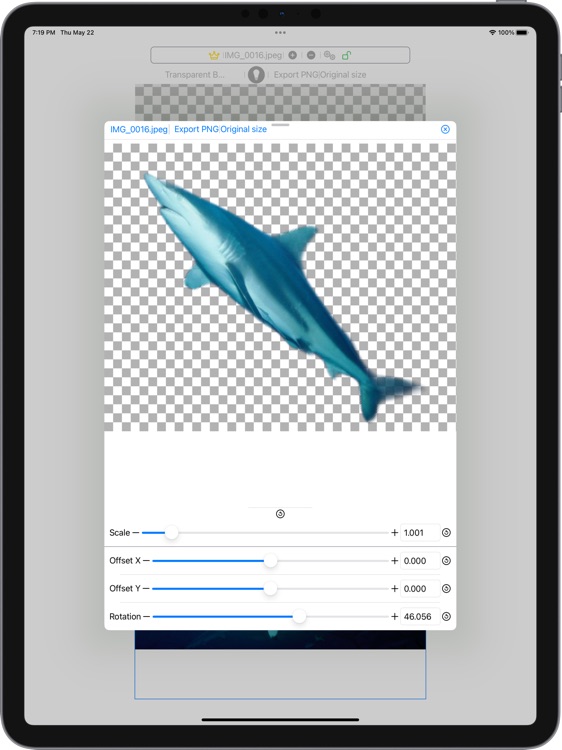
• Multi-Image Composition: Freely arrange multiple cutouts on the same canvas. Move, scale, and rotate them however you want to create your ideal composition.
• Restyle Image: Choose from over 10 styles to transform your image. Apply styles to individual cutouts or the final composite.
• Background Replacement: Use a transparent background, a solid color, or any image from your device — your choice.
• Intuitive Editing Tools: Use simple gestures to move, resize, and rotate each cutout. Interactions are optimized separately for macOS and iOS to feel right at home on every device.
• Smart Light Blending: Adjust lighting to improve realism and cohesion in your final image. Drag to position a light source, tweak its color, intensity, and range, and preview the result in real time.
• Flexible Export Options: Export your cutouts, composites, and light-adjusted images in a variety of sizes — perfect for product listings, social posts, resumes, profile pictures, and more.
• Privacy by Design: Everything is processed locally — your images never leave your device unless you choose to share them.
• No high-end hardware is required, ordinary Mac, iPhone, iPad can also run it and enjoy the convenience of AI.
• No Ads. No Tracking. No Cloud: A clean, focused tool — no interruptions, no surveillance.
Pricing & Unlock Options
• Free
- Unlimited AI cutouts — no usage limits, no credits required
– Unlimited editing (move, scale, rotate) for each cutout
– Unlimited background changes
– Export cutouts, composites, and light-adjusted images in original size
– Work with up to 2 cutout images at the same time
• One-Time Purchase
– Export the image with the background removed
– Restyle the image with over 10 styles available
• Subscription
– Compose using multiple cutouts
– Full access to light blending features
– Export in a range of custom sizes
• Payment will be charged to your App Store account.
• Subscriptions auto-renew unless canceled at least 24 hours before the end of the current period.
• Manage subscriptions in your App Store account settings.
Privacy & Terms
• Privacy Policy: https://h53d.github.io/aiimg/policy.txt
• Terms of Use (EULA): https://www.apple.com/legal/internet-services/itunes/dev/stdeula/
Have questions or need support? Reach out to danjian42@gmail.com.
Disclaimer:
AppAdvice does not own this application and only provides images and links contained in the iTunes Search API, to help our users find the best apps to download. If you are the developer of this app and would like your information removed, please send a request to takedown@appadvice.com and your information will be removed.
AppAdvice does not own this application and only provides images and links contained in the iTunes Search API, to help our users find the best apps to download. If you are the developer of this app and would like your information removed, please send a request to takedown@appadvice.com and your information will be removed.
