You are using an outdated browser. Please
upgrade your browser to improve your experience.

Camassia, your free path finding Camera Assistance

Camassia
by iXpoint Informationssysteme GmbH

What is it about?
Camassia, your free path finding Camera Assistance.
App Screenshots

App Store Description
Camassia, your free path finding Camera Assistance.
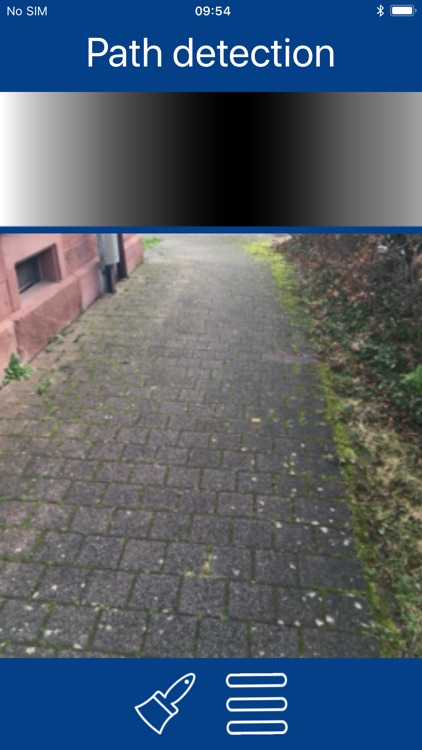
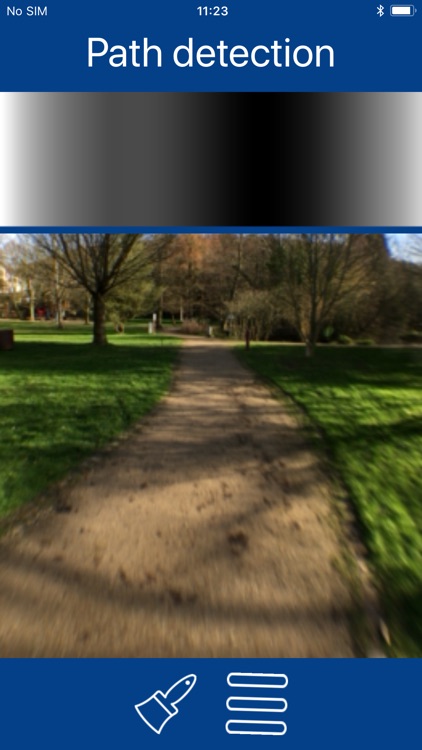
Camassia offers visually impaired humans an assistance to find the free path in front to them. In order to achieve this Camassia generates an acoustic representation of the path by analyzing the camera image and informs you continuously where it assumes free space.
To detect the path the camera needs to see the surrounding area in front of you. Therefore hold the smartphone straight in front of you, at best tilt it forward slightly. The field of view increases when holding the smartphone in landscape orientation. You can also increase the the field-of-view of your camera by using an optional wide-angle lens.
The aim of free space is visualized in black on a large bar on top of the screen and using sounds. Both sound frequency and stereo panorama represent the aim to free space. High pitches denote free space to the left, low pitches denote free space on the right. There is a soft pulsating tone to illustrate the straight aim. Use soft swings to the left and right for a better understanding of your surroundings.
In order to further improve the detection the color of the path in front of you can be adjusted. For this, point the smartphone camera to known free space and press the color button or the pause button of a connected headset. You have to repeat this step for differently colored paths or if the light conditions changed a lot.
The process of sonification may appear unfamiliar to inexperienced users, however the surrounding can be identified fairly quickly with a little bit of training. Even changes in the path and hence the necessary recalibration of the path-color can be detected.
Please consider using bone conduction headsets so you can hear everything that is around you. Have a try with the alternative acoustic representations you find in the configuration.
Please be aware, that no automatic detection will ever be perfect, never rely solely on its function. This App cannot replace a white cane or a guide dog. Please perform an Orientation and Mobility training beforehand, so know how to move safely in your environment.
We plan on adding additional modules to this App, so please give us feedback.
Disclaimer:
AppAdvice does not own this application and only provides images and links contained in the iTunes Search API, to help our users find the best apps to download. If you are the developer of this app and would like your information removed, please send a request to takedown@appadvice.com and your information will be removed.
AppAdvice does not own this application and only provides images and links contained in the iTunes Search API, to help our users find the best apps to download. If you are the developer of this app and would like your information removed, please send a request to takedown@appadvice.com and your information will be removed.
