You are using an outdated browser. Please
upgrade your browser to improve your experience.

Codeit Expenses is an application designed to organize your income and expenses, your movements of money are recorded by date, you can review the reports daily, weekly, monthly or yearly

CodeIt
by Codeit Softwares Limited


What is it about?
Codeit Expenses is an application designed to organize your income and expenses, your movements of money are recorded by date, you can review the reports daily, weekly, monthly or yearly.
App Screenshots


App Store Description
Codeit Expenses is an application designed to organize your income and expenses, your movements of money are recorded by date, you can review the reports daily, weekly, monthly or yearly.
• Organizing your expenses allow you to have a better control over your money.
• No need to send hard copy of bills to office.
• Upload you bills easily.
• Track your income and expenses and classify them by Category.
• You cannot modify or delete the record that you have created.
• Available report: weekly, monthly and yearly.
• Choose the currency used in your country.
Note:- This app required Company ID, user ID and Password to login. Only Codeit Company registered employee can use this app.
No user registration from the app.
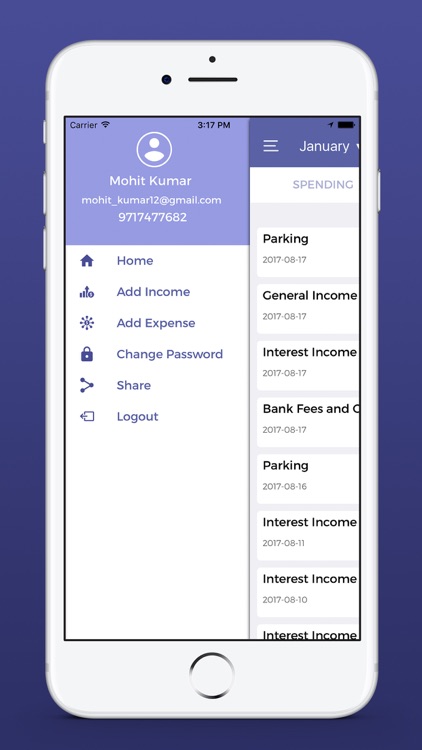
Basic useful features which are as following.
(I). Home (Detail Custom Report)
(II). Add Income
(III). Add Expense
(IV). Change Password
(V). Logout
(I). Home: In Home dashboard user can keep and manage daily account records.
it'll shows you all available weekly, monthly and yearly account spending and transaction (Income & Expenses) data.
(II). Add Income
>Addition your savings income money by Add Income button option.
>Select "Date" for your income. current date is shown by default.
>Now user can select Income category from list.
>Enter income "Currency".
>Enter income "Amount".
>Select your income type like "Cash" or "Bank".
>Enter income "Remark".
>Enter income "Upload attachment (if Any)"
(III). Add Expense
>Addition your Expense money by Add Expense button option.
>Select "Date" for your expense. current date is shown by default.
>Now user can select expense category from list.
>Enter expense "Currency".
>Enter expense "Amount".
>Select your payment method type like "Cash" or "Bank".
>Enter expense "Remark".
>Enter expense "Upload Bills (if Any)"
(IV). Change Password:- User can change password.
Enter your old password.
Enter New Password.
Confirm Password.
(V). Logout :- Click logout button to logout the app
Disclaimer:
AppAdvice does not own this application and only provides images and links contained in the iTunes Search API, to help our users find the best apps to download. If you are the developer of this app and would like your information removed, please send a request to takedown@appadvice.com and your information will be removed.
AppAdvice does not own this application and only provides images and links contained in the iTunes Search API, to help our users find the best apps to download. If you are the developer of this app and would like your information removed, please send a request to takedown@appadvice.com and your information will be removed.
