You are using an outdated browser. Please
upgrade your browser to improve your experience.

Your contacts are the most important data in your phone which may be lost in seconds

Easy Contact Backup Manager
by Dipak Keshariya


What is it about?
Your contacts are the most important data in your phone which may be lost in seconds.
App Screenshots

App Store Description
Your contacts are the most important data in your phone which may be lost in seconds.
Contacts Backup keeps your contacts in a safe place.
So Never worry about losing your contacts!
Contacts Backup is the easiest way to backup and restore your contacts all from your phone without needing a computer or synchronisation. You can backup all your contacts with a single touch and send them to yourself as a .vcf attachment via email quick, easy, and safe.
Features:
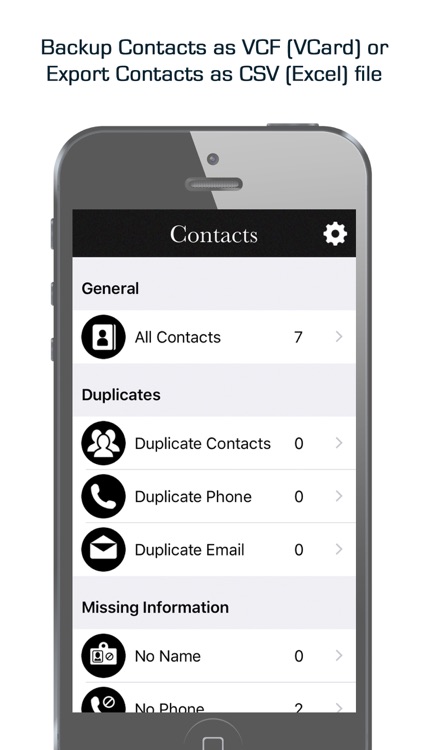
*** Cleanup of Duplicate Contacts.
*** Duplicate Phone Number.
*** Duplicate Email.
*** Duplicate Name.
*** No Name.
*** No Phone Number.
*** Offline Backup. No need to sync to any server. Just email the backup file to yourself.
*** Easy restore. No need to use any app to restore backup file. Just tap on the
.vcf backup file in the iPhone, iPod Touch or iPad Mail client and restore your contacts for FREE.
*** Easily transfer contacts between iOS Devices using just email client.
*** Backup Contacts as VCF (VCard).
BACKUP
○ One tap to Select contacts!
○ Select Contact which u want.
○ Quickly export your backups , Email
○ Move contacts between accounts (Through Email)
----------
IMPORTANT NOTE: After sending backup file (*.vcf) to yourself, please check your inbox to see if message arrived and contains attachment (backup file). Sometimes email providers block attachments if attachment size is too large. Try with another mail account if possible, to send your backup file.
Disclaimer:
AppAdvice does not own this application and only provides images and links contained in the iTunes Search API, to help our users find the best apps to download. If you are the developer of this app and would like your information removed, please send a request to takedown@appadvice.com and your information will be removed.
AppAdvice does not own this application and only provides images and links contained in the iTunes Search API, to help our users find the best apps to download. If you are the developer of this app and would like your information removed, please send a request to takedown@appadvice.com and your information will be removed.
