You are using an outdated browser. Please
upgrade your browser to improve your experience.

GoodTimeKeeper is time management app for meeting/conference

GoodTimeKeeper - Timer&Alarm
by Toru Shinnae



GoodTimeKeeper Offers Apple Watch App
Check the details on WatchAware
Check the details on WatchAware
What is it about?
GoodTimeKeeper is time management app for meeting/conference.
App Store Description
GoodTimeKeeper is time management app for meeting/conference.
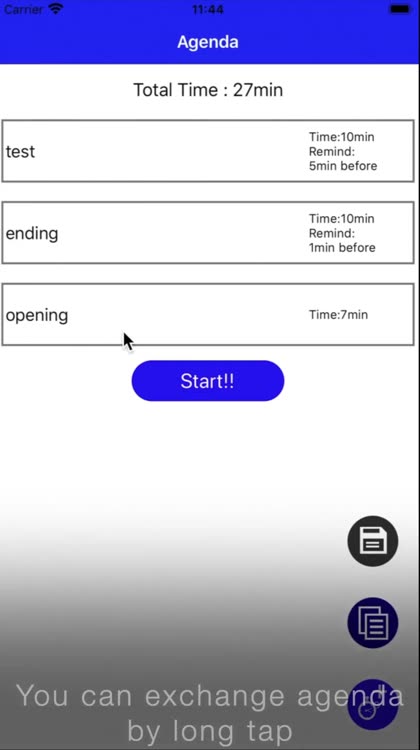
- Basic how to use
1. Select Add(+) button.
2. Input agenda name, select time and alarm sound for agenda.
3. Select Create button.
4. Repeat Step1~3 for agenda of your conference.
5. Select Start
Timer Start
6. If time up, select extend or next
7. If select extend, start stop watch function.
If select next, will start timer for next agenda.
8. If final agenda was finished, result is displayed.
User can find plan and result for each of agendas.
- Save/Apply template setting
Can save current setting by pushing save button (like a floppy disk)
Can apply template setting by pushing apply button (like a list)
- Setting
Can check current notification setting.
If notification setting is ON, this app can notify alarm end even if this app was gone to background.
Disclaimer:
AppAdvice does not own this application and only provides images and links contained in the iTunes Search API, to help our users find the best apps to download. If you are the developer of this app and would like your information removed, please send a request to takedown@appadvice.com and your information will be removed.
AppAdvice does not own this application and only provides images and links contained in the iTunes Search API, to help our users find the best apps to download. If you are the developer of this app and would like your information removed, please send a request to takedown@appadvice.com and your information will be removed.
