You are using an outdated browser. Please
upgrade your browser to improve your experience.
As in classic Color Lines puzzle game, the objective is to earn maximum score

i Color Lines Puzzle Game
by REVV SCIENCES LLC
What is it about?
As in classic Color Lines puzzle game, the objective is to earn maximum score. Points are earned every time you manage to remove some balls from the board.
App Details
Version
3.0
Rating
NA
Size
17Mb
Genre
Arcade Puzzle
Last updated
September 19, 2017
Release date
June 23, 2016
More info
App Store Description
As in classic Color Lines puzzle game, the objective is to earn maximum score. Points are earned every time you manage to remove some balls from the board.
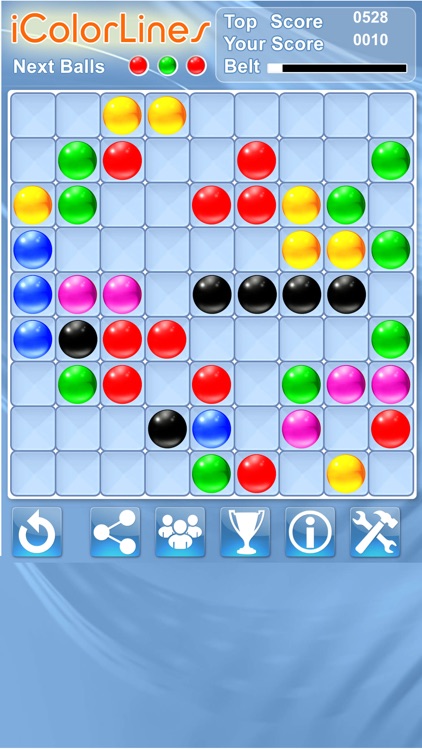
When game starts, you are presented with a board divided into 81 squares. To move a ball, click on it to select, and then click on the destination cell to align it with the same color ball or a group of same color balls.
The line (vertical or horizontal or diagonal) must be at least five balls in length. Every turn the computer adds three new balls to the board. Pay attention to the color of upcoming balls.
Your current score, your top score and your earned belt are displayed on the top.
There are six buttons at the bottom of the screen (from left to right): "Start a New Game", "Share", "Game Portal", "Leader Board", "Help" and "Settings".
Depending on your score, you will be awarded by one belt from nine colors - white for beginner and up to the black belt as the highest rank. You will be competing against players in your country and worldwide.
Leader Board displays all i Color Lines puzzle game players. You can see player’s rank, country, name, score and belt color.
Quick help is available by clicking on "Help" icon. More useful information, helpful tips, tricks, game rules and strategy you can find at icolorlines.com.
You can can manage your iColorLines profile, see yours and other players activities, send messages and check notifications by clicking on "Game Portal" button.
Disclaimer:
AppAdvice does not own this application and only provides images and links contained in the iTunes Search API, to help our users find the best apps to download. If you are the developer of this app and would like your information removed, please send a request to takedown@appadvice.com and your information will be removed.
AppAdvice does not own this application and only provides images and links contained in the iTunes Search API, to help our users find the best apps to download. If you are the developer of this app and would like your information removed, please send a request to takedown@appadvice.com and your information will be removed.
