You are using an outdated browser. Please
upgrade your browser to improve your experience.

LiDAR View provides a real-time image display of both LiDAR and camera outputs

LiDAR View
by HAN WEI WANG


What is it about?
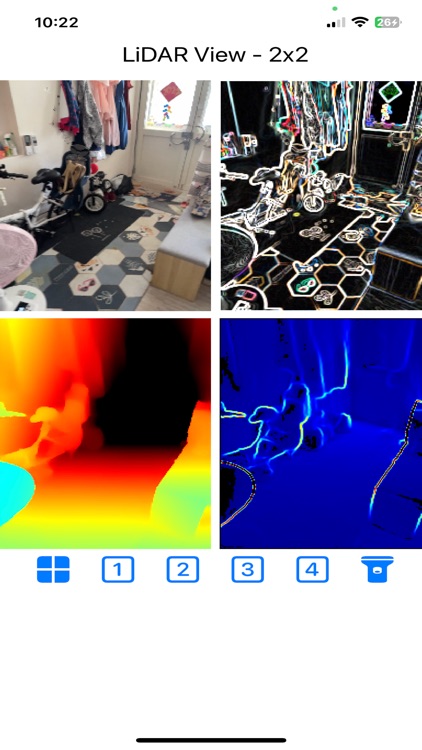
LiDAR View provides a real-time image display of both LiDAR and camera outputs. Users can select images from either the LiDAR, the camera, or a combination of both.
App Screenshots

App Store Description
LiDAR View provides a real-time image display of both LiDAR and camera outputs. Users can select images from either the LiDAR, the camera, or a combination of both.
- When choosing an image from the LiDAR (options 3 or 4), it can be particularly useful for visibility in dark environments.
- Options 2 or 4 display images from both the camera and LiDAR, highlighting the contours of the surroundings.
When you scroll to the left on the number icon, two additional options will appear. You can change the viewpoint in the 3D Point Cloud View by panning. For stereo viewing, you can use Google Cardboard or a similar device to see real-time stereo images.
You can save the screenshot by clicking the camera icon, and view the saved screenshot by clicking the photo icon.
Additionally, you can activate the flashlight by clicking the torch icon.
If you have any suggestions, please contact us by emailing hereyouare1981@gmail.com. Thank you!
Disclaimer:
AppAdvice does not own this application and only provides images and links contained in the iTunes Search API, to help our users find the best apps to download. If you are the developer of this app and would like your information removed, please send a request to takedown@appadvice.com and your information will be removed.
AppAdvice does not own this application and only provides images and links contained in the iTunes Search API, to help our users find the best apps to download. If you are the developer of this app and would like your information removed, please send a request to takedown@appadvice.com and your information will be removed.
