You are using an outdated browser. Please
upgrade your browser to improve your experience.

Create your own maps and manage your favorite locations, add an icon, color, rating or your own created tags

Map Locations
by Piet Hein van Cleef


What is it about?
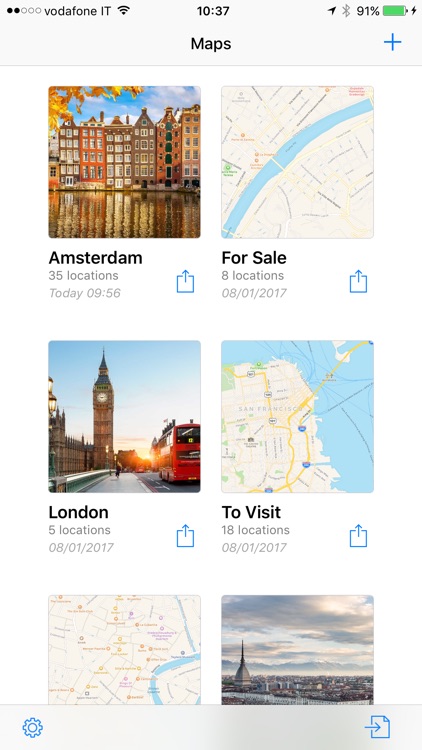
Create your own maps and manage your favorite locations, add an icon, color, rating or your own created tags. Add photos with notes and create visits sorted by date.
Map Locations is FREE but there are more add-ons
-
$1.99
Full Version
App Screenshots


App Store Description
Create your own maps and manage your favorite locations, add an icon, color, rating or your own created tags. Add photos with notes and create visits sorted by date.
Save your Map Locations files in iCloud Drive, Dropbox, Google Drive or send by email to share them with your friends or colleagues.
Import large amounts of data using CSV files created in Excel or Numbers.
Use the calendar to add events and appointments with optional alerts linked to locations.
Keep track of your locations, whether it's your number one shops & restaurants, or the places you visit as a sales representative or realtor.
Your maps are completely private and you don't need an account to use the app.
Import & Export Features:
• Import and export your Map Location files
• Import and export CSV files for use in Excel or Numbers
• Export locations as PDF text document
• Save your files to iCloud Drive, Dropbox, Google Drive or send by email
• Import multiple contacts from your address book as locations
• Import address from clipboard
Location Features:
• Choose from 100+ icons and 10+ colours
• Create your own tags to identify and filter your locations
• Add visits to your locations
• Add photos with notes
• When info is added open website, email or phone with one click
Map Features:
• Filter your locations on tags, icons, colors or rating
• Search through all your locations or existing points of interest
• Get directions to a selected location
• View your location in Google Maps
• View locations as a list
• Edit multiple locations at once using the list view
• Share selected locations as text
List View Features:
• Edit multiple locations at once
• Move or copy multiple locations between maps
• Sort locations on name, icon, color, rating or date (tap again to reverse)
• Filter your locations on tags, icons, colors or rating
Application Settings:
• Restore deleted locations
• Change the size of the location pins
• Set default color and icon for new locations
• Change paper size for PDF
• Today widget showing your latest locations
The free version is limited to 10 locations, upgrade to Map Locations Pro to create as many locations as you like.
Send an email to maplocations@ph-neutraal.nl if you have any questions or encounter any problems.
Disclaimer:
AppAdvice does not own this application and only provides images and links contained in the iTunes Search API, to help our users find the best apps to download. If you are the developer of this app and would like your information removed, please send a request to takedown@appadvice.com and your information will be removed.
AppAdvice does not own this application and only provides images and links contained in the iTunes Search API, to help our users find the best apps to download. If you are the developer of this app and would like your information removed, please send a request to takedown@appadvice.com and your information will be removed.
