You are using an outdated browser. Please
upgrade your browser to improve your experience.

Advanced Medication Reminder with Dynamic Scheduling™

Medi-Prompt Plus Med Reminder
by ModernObsession


What is it about?
Advanced Medication Reminder with Dynamic Scheduling™
App Screenshots


App Store Description
Advanced Medication Reminder with Dynamic Scheduling™
Medi-Prompt™ is simply the best app for managing your medication schedules. It’s the medication reminder that does what other don't. The secret is Dynamic Scheduling.
Medi-Prompt is not just another 'alarm clock' medication app. With other med apps, if you're late taking a med, or early, or you take a different dose or do anything else out of the ordinary (life rarely goes according to plan!) other apps just plow forward with "reminders" which is unsafe. Medi-Prompt takes everything into account before scheduling your next dose...then upon your next dose it analyzes the situation again & warns you of possible problems.
Medi-Prompt
- reminds you when your medication is due even when the app is closed, or there’s no internet
- schedules your meds the way YOU want to take them
- lets you create a reminder if your meds aren’t on you when you’re prompted
- lets you postpone all prompts while you’re in a meeting, or a movie
- gives you a long list of possible warnings you can enable, to keep you safer
If you want to keep it simple, the app stays out of your way. But if you tell the app you don't want to take doses any closer than 2 hours apart, and you try to take a dose after only an hour, you'll be warned. If you tell Medi-Prompt you should only take 3 doses in a day, you'll be warned if you try to take more. If you try to take a dose 2 hours early, and you've told Medi-Prompt you should never take a dose more than an hour before it is due, you'll be warned. And more!
FEATURES:
- MULTIPLE PATIENTS: Use for children, parents, spouses, clients, patients, etc.
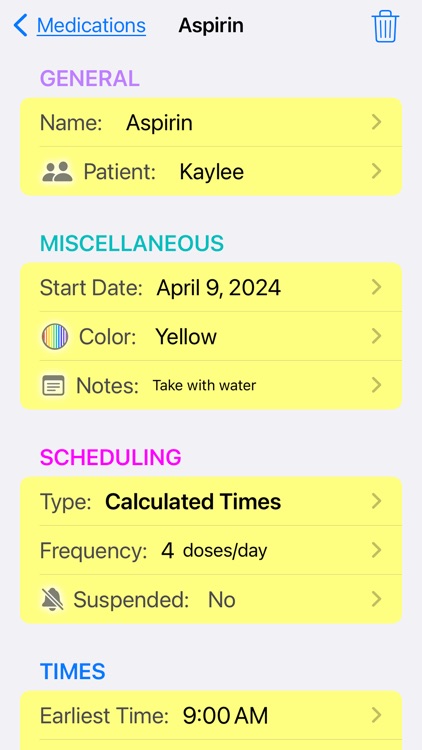
- COLOR-CODED MEDICATIONS: Easier to find and safer too; you can choose each med’s color
- FIXED COURSE: Like antibiotics, when you take a certain number then stop
- INTERVALS: Choose the time between prompts
- SOUNDS: Set a unique sound for each medication
- REMINDER NOTES: Write a note for each med, you’ll see it when taking the medication
- LOG NOTES: When taking a dose, you can add a note that stays with that log, for later reference
- UNDO: Delete any entry...not just the last one
- SPECIAL REMINDER: No access to meds when alerted?...set a reminder for when they will be
- MULTI-DAY PATTERNS: Twice a week, every other day, one week off per month, etc.
- LOGS: A private record of doses taken (or skipped). You can send it to your doctor or caregiver if you like
- MEETING MODE: Silence prompts (alerts) for a meeting, or during a movie...to restart at a certain time
- SUSPEND: Silence just one specific medication by ‘suspending’ it...un-suspend any time
- EASY TO SET UP: Hints guide you as you fill out medication info
- EASY TO USE: Just 2 taps to take most medications
- PASSWORD PROTECTION (optional): Set a password to keep others from opening Medi-Prompt
- FAQ: A long list of questions/answers, to help you use the app
- ALWAYS AVAILABLE: Get alerts even when the app is closed, and when there is no internet
- CONTACT SUPPORT: From within the app, send a message to support
MULTIPLE SCHEDULING TYPES
(1) As Needed (“Ad-Hoc”): No alerts, but checks your safety limts & logs each dose
(2) Scheduled (“Timed”): Set your own schedule of times
(3) Calculated: Specify # of doses/day, first & last times, and doses will be spread out equally. If you’re early or late, doses are recalculated (taking into account your safety rules).
(4) Regular Intervals - Day by day: Specify a fixed interval between doses. If taken late, the next dose will be rescheduled maintaining that interval. A dose that is too late will be rescheduled for the next morning.
(5) Regular Intervals - Round the clock: Specify a fixed interval between doses. If taken late, the next dose will be rescheduled maintaining that interval, around the clock.
Terms of Use: https://www.apple.com/legal/internet-services/itunes/dev/stdeula/
Privacy Policy / Support: https://www.modernobsession.com/privacy.html
Disclaimer:
AppAdvice does not own this application and only provides images and links contained in the iTunes Search API, to help our users find the best apps to download. If you are the developer of this app and would like your information removed, please send a request to takedown@appadvice.com and your information will be removed.
AppAdvice does not own this application and only provides images and links contained in the iTunes Search API, to help our users find the best apps to download. If you are the developer of this app and would like your information removed, please send a request to takedown@appadvice.com and your information will be removed.
