You are using an outdated browser. Please
upgrade your browser to improve your experience.

Eliminate confusion when calculating coins by using the Money Counting Calculator

Money Counting Calculator
by Wallace Consultancy LLC
What is it about?
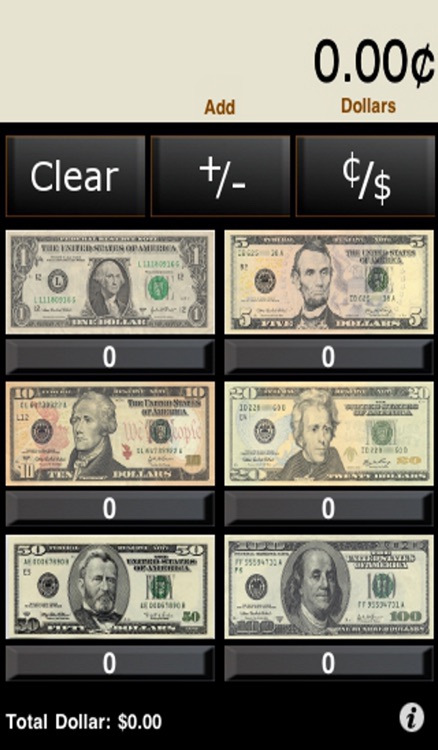
Eliminate confusion when calculating coins by using the Money Counting Calculator. The popular Money Counting Calculator uses realistic coin buttons for the penny, nickel, dime, quarter, half dollar, and coin dollar. Additionally, the Money Counting Calculator uses doll buttons for the one-dollar bill, five-dollar bill, ten-dollar bill, twenty-dollar bill, fifty-dollar bill, and the one hundred dollar bill.
App Store Description
Eliminate confusion when calculating coins by using the Money Counting Calculator. The popular Money Counting Calculator uses realistic coin buttons for the penny, nickel, dime, quarter, half dollar, and coin dollar. Additionally, the Money Counting Calculator uses doll buttons for the one-dollar bill, five-dollar bill, ten-dollar bill, twenty-dollar bill, fifty-dollar bill, and the one hundred dollar bill.
The Money Counting Calculator has a display with the cent sign (¢), dollar sign ($), and 2-digit decimals. When a currency button is pushed, they add their money value to the amount at the top of the screen based upon the number of times they are pushed. The count for each currency is updated underneath each currency image. Additionally, you can press the currency count underneath each coin and a convenient message box will prompt you to enter in specific coin count.
The Money Counting Calculator can be used to count money and teach currency values. You can set the function of the calculator to add or subtract. In addition, a convenient toggle button allows you to switch between coins and dollars.
Disclaimer:
AppAdvice does not own this application and only provides images and links contained in the iTunes Search API, to help our users find the best apps to download. If you are the developer of this app and would like your information removed, please send a request to takedown@appadvice.com and your information will be removed.
AppAdvice does not own this application and only provides images and links contained in the iTunes Search API, to help our users find the best apps to download. If you are the developer of this app and would like your information removed, please send a request to takedown@appadvice.com and your information will be removed.
