You are using an outdated browser. Please
upgrade your browser to improve your experience.
Your iPad is all you need to have to enjoy the benefits of your Kangaroo PC on the go

OSLinx Windows Monitor
by DEVGURU Co., Ltd.


What is it about?
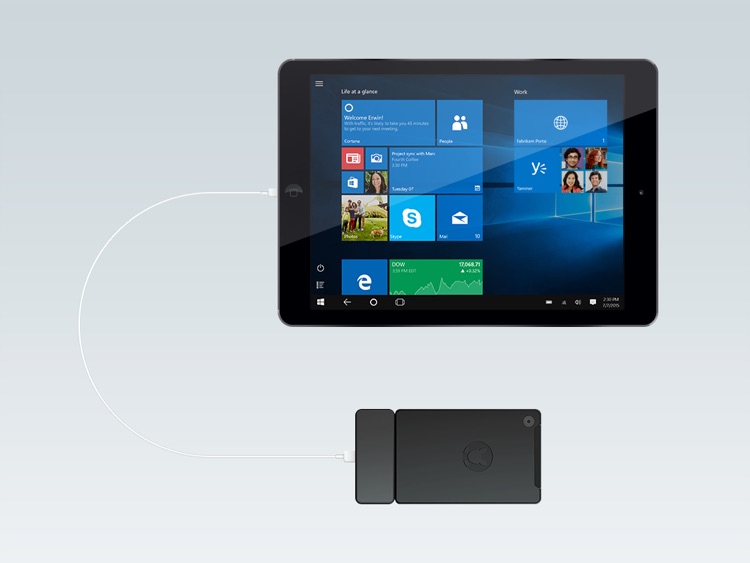
Your iPad is all you need to have to enjoy the benefits of your Kangaroo PC on the go. OSLinx Windows Monitor turns your iOS device into a primary display of your Kangaroo PC. It connects to a PC through a Lightning-to-USB cable and works with OSLinx Server installed on the Kangaroo PC. OSLinx Windows Monitor supports mouse as well as multitouch gestures.
App Screenshots

App Store Description
Your iPad is all you need to have to enjoy the benefits of your Kangaroo PC on the go. OSLinx Windows Monitor turns your iOS device into a primary display of your Kangaroo PC. It connects to a PC through a Lightning-to-USB cable and works with OSLinx Server installed on the Kangaroo PC. OSLinx Windows Monitor supports mouse as well as multitouch gestures.
No Setup and Hassle Free: Once the OSLinx Server is installed on your Kangaroo PC, just plug your iPad to the PC and it works!
[In-app Purchase Options]
At purchase, you can enjoy an untethered connection to your Kangaroo PC using Wi-Fi. Kangaroo PCs support Wi-Fi Direct so that you can connect your iPad to the PC as if your PC is a Wi-Fi access point. Also available is an option to use accessory keyboards to your iPad in entering data to and controlling your PC.
Disclaimer:
AppAdvice does not own this application and only provides images and links contained in the iTunes Search API, to help our users find the best apps to download. If you are the developer of this app and would like your information removed, please send a request to takedown@appadvice.com and your information will be removed.
AppAdvice does not own this application and only provides images and links contained in the iTunes Search API, to help our users find the best apps to download. If you are the developer of this app and would like your information removed, please send a request to takedown@appadvice.com and your information will be removed.
