You are using an outdated browser. Please
upgrade your browser to improve your experience.

You can use the remote app to control your Samsung Smart TV

Remote Control for TV Samsung
by LB Mobile Apps
What is it about?
You can use the remote app to control your Samsung Smart TV. Just connect your phone/tablet and your TV to the same internet connection to use our app.
App Store Description
You can use the remote app to control your Samsung Smart TV. Just connect your phone/tablet and your TV to the same internet connection to use our app.
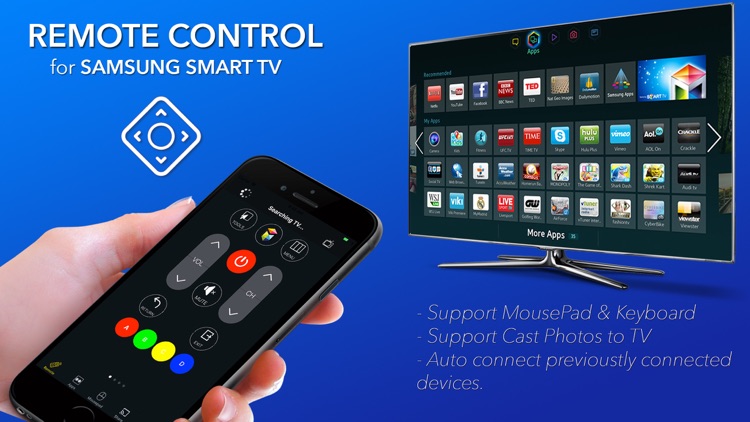
The remote application not only operates like a full-function remote device, but also cast photos to your Samsung TV.
The app is built with very clear user interface help users easily interact with your TV. With our application, you can adjust volume and change channels, browse Smart Hub, navigate applications on Samsung Smart TV, easier to surf web than using physical Samsung remote.
The remote app lets you easily control your Samsung smart TV. Smart Remote only supports 2010(C Series), 2011(D Series), 2012(E Series), 2013(F Series), 2014(H Series), 2015(J Series), 2016(K), 2017(Q,M) and 2018(Q,N) Samsung Smart TV.
Features
- Navigate through Samsung Smart Hub
- Increase/decrease TV volume
- Change program channels
- Enter text easily on web browser
- Navigate on app content
- Connect to all Samsung smart tv
- Cast photos to TV
Premium Features:
- Control your TV with KEYBOARD
- Control your TV with TOUCH BAR
- Easily Cast Your Photos to TV
Subscription plan:
- 1 Week Premium Upgrade with 3 Day trial is $4.99
- Price may vary depending on the country.
- Payment will be charged to iTunes Account at confirmation of purchase.
- Subscription automatically renews unless auto-renew is turned off at least 24-hours before the end of the current period.
- Account will be charged for renewal within 24-hours prior to the end of the current period, and identify the cost of the renewal.
- Subscriptions may be managed by the user and auto-renewal may be turned off by going to the user's Account Settings after purchase.
- Any unused portion of a free trial, if offered, will be forfeited when the user purchase subscription to that publication, where applicable.
By using our app, you are agreeing to our Privacy Policy and Terms of Use at:
https://www.lbmobile.co/privacy
https://www.lbmobile.co/terms
For any question/support, please contact us by send an email to support@lbmobile.co or visit our support website at https://www.lbmobile.co/contact-us
Disclaimer:
AppAdvice does not own this application and only provides images and links contained in the iTunes Search API, to help our users find the best apps to download. If you are the developer of this app and would like your information removed, please send a request to takedown@appadvice.com and your information will be removed.
AppAdvice does not own this application and only provides images and links contained in the iTunes Search API, to help our users find the best apps to download. If you are the developer of this app and would like your information removed, please send a request to takedown@appadvice.com and your information will be removed.
