You are using an outdated browser. Please
upgrade your browser to improve your experience.

Create custom lighting designs with the starCTRL app

starCTRL
by Videndum Production Solutions, Inc.
What is it about?
Create custom lighting designs with the starCTRL app.
App Store Description
Create custom lighting designs with the starCTRL app.
1. Connect instantly
Rainbow 2 and Double Rainbow fixtures will be auauto-discovered by starCTRL to make connecting fast and easy. Switch them into starCTRL app mode via the config menu (requires firmware 0.8 or later) and open starCTRL, it’s that simple.
2. Control simply
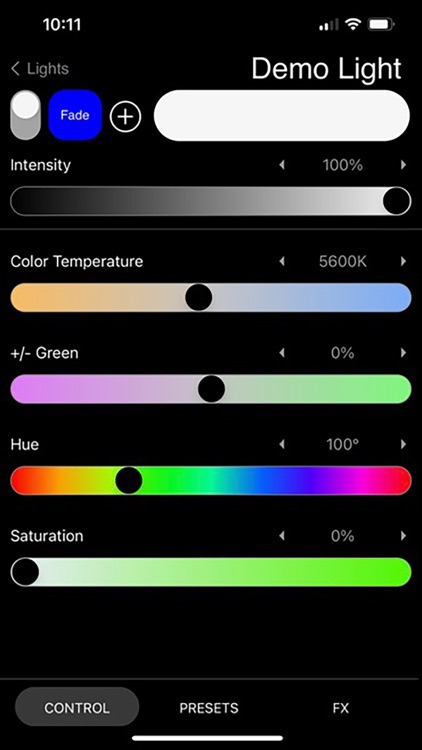
Ccontrol of lamp color and intensity at your fingertips. Control parameters: Intensity, Color Temp, +/- Green, Hue, Saturation, Output Mode.
Quickly adjust color and temperature with presets. Popular colors and color temps from 1750K through increments to 6500K.
Access all Rainbow series effects. Select from all built-in lighting effects and tune their control parameters.
3. Customize
Group lights for larger designs. Apply parameters to a whole group or individual fixtures.
Save favorite colors and FX. Create custom swatches for color, intensity and FX.
Operate smooth transitions with fade time settings. Select preferred fade time up to 5 seconds
Rainbow 2 and Double Rainbow lights must be update to software version 0.8B
Update Files - https://www.quasarscience.com/pages/support-double-rainbow-and-rainbow-2
How to Update - https://help.quasarscience.com/rr-r2/update-rr-r2-firmware
Keywords: starcontrol starctrl
Disclaimer:
AppAdvice does not own this application and only provides images and links contained in the iTunes Search API, to help our users find the best apps to download. If you are the developer of this app and would like your information removed, please send a request to takedown@appadvice.com and your information will be removed.
AppAdvice does not own this application and only provides images and links contained in the iTunes Search API, to help our users find the best apps to download. If you are the developer of this app and would like your information removed, please send a request to takedown@appadvice.com and your information will be removed.
