You are using an outdated browser. Please
upgrade your browser to improve your experience.

Introducing the SuperLemon Mobile App - to make customer support for your Shopify business easier and efficient

Superlemon
by Webaroo Inc


What is it about?
Introducing the SuperLemon Mobile App - to make customer support for your Shopify business easier and efficient. A simple app that leverages your personal WhatsApp to amplify your business conversations and chats with your customers. Level up to the next stage.
App Screenshots


App Store Description
Introducing the SuperLemon Mobile App - to make customer support for your Shopify business easier and efficient. A simple app that leverages your personal WhatsApp to amplify your business conversations and chats with your customers. Level up to the next stage.
The SuperLemon app helps Shopify store owners organize and optimize customer support via personal WhatsApp. (Abandoned cart recovery, whatsApp chat & share, notifications etc.) read below to know more.
Requires :
• Store on Shopify. Know more about this
• SuperLemon subscription, click to know more
• WhatsApp app on the same phone (to send messages and order notifications to customers)
How to get started?
1. Install the Superlemon app on your iPhone and enter your Shopify store URL to get started. It’s that easy!
2. Choose a specific action chat and choose a specific message for that customer.
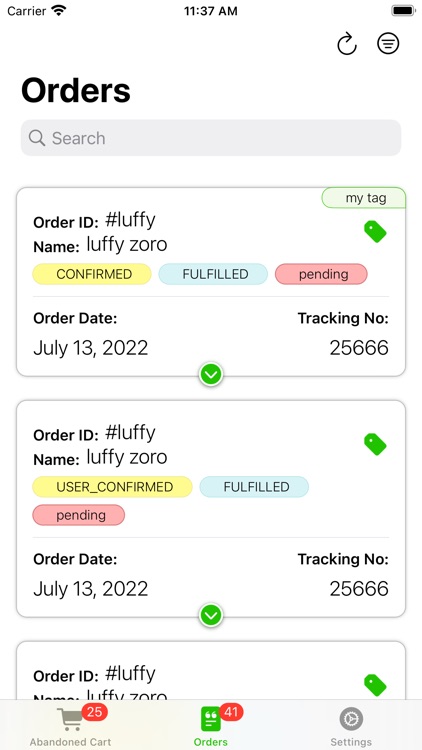
3. Once you login, you will see there are three main tabs at the bottom. Abandoned Cart, All Orders, and Settings. By default, you will see the "All Orders" tab, which will contain all the order information.
4. To view the entire order details, you can click on the order card, and the card will expand to show the entire order details, starting from:
• Order ID
• Order Name
• Order Status (includes confirmation, fulfillment, and payment status)
• Order Date
• Tracking number (if applicable)
• The address of the customer
• Product Details
• Total Order Value
FEATURES :
This app will allow you to manually chat with customers on WhatsApp for each specific order.
• You can browse through different orders for that particular customer, and orders are divided into two groups: open orders and abandoned cart orders. You select which order type you want to browse, and within that, you can also take action on each and every order.
• To take an action, below the order details, there will be an option to select a template. You can select a template of your choice by clicking "Select Template" to respond to the customer.
• On clicking "Apply", you will be redirected to the WhatsApp app on your mobile phone with the textbox with your selected template in the chat section of customer’s chat thread automatically, and you just need to click on the Send button.
• In the Settings section you can create your own custom Tags to assign it to orders and based on the tags you filter your orders as well using the Filter button next to search.
• You can also use the new and powerful search to search across all different orders based on Order name, Order ID, Product Details etc.
Disclaimer:
AppAdvice does not own this application and only provides images and links contained in the iTunes Search API, to help our users find the best apps to download. If you are the developer of this app and would like your information removed, please send a request to takedown@appadvice.com and your information will be removed.
AppAdvice does not own this application and only provides images and links contained in the iTunes Search API, to help our users find the best apps to download. If you are the developer of this app and would like your information removed, please send a request to takedown@appadvice.com and your information will be removed.
