You are using an outdated browser. Please
upgrade your browser to improve your experience.

Now supports iPad, including FaceTime on iPad 2

Tap2Call
by Nathan Cory


What is it about?
Now supports iPad, including FaceTime on iPad 2!
App Store Description
Now supports iPad, including FaceTime on iPad 2!
The easiest way to add photo speed-dialing to your home screen.
KEY FEATURES
- Creates photo-icons of your your favorite contacts on your home screen
- Uses your Address Book's photo library or allows you to add your own photo
- Simply tap to call, e-mail, text or FaceTime your contact
- Each icon generated by Tap2Call functions just like a separate app
STEP-BY-STEP INSTRUCTIONS
- Download and launch Tap2Call
- Click the '+' button in the top right-hand corner
- Pick a contact from your Address Book
- Select the phone number or email address to use
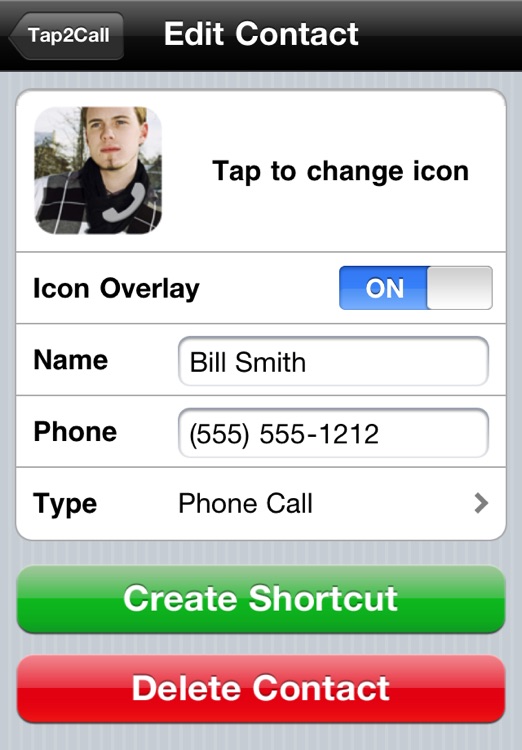
- Tap the icon if you'd like to assign a different photo (optional)
- Pick what you'd like the icon to do: Call, Text, Email or FaceTime
- Tap 'Create Shortcut' to create your icon
- Select the '+' icon at the bottom of the screen and pick 'Add to Home Screen'
- Wasn't that easy?
FEEDBACK
Have a great idea or suggestion for Tap2Call? Email feedback@tap2callapp.com – your feedback helps drive the features that we will add to Tap2Call.
PRIVACY
In order to create your custom icon, Tap2Call temporarily uploads your photo to our server. Your photo is not accessible by any other user and is deleted within 15 minutes. No contact information is transmitted to our server.
SUPPORT
Our monkeys work around the clock. Email monkeys@tap2callapp.com and we'll respond as soon as possible.
Thanks for checking out Tap2Call!
Disclaimer:
AppAdvice does not own this application and only provides images and links contained in the iTunes Search API, to help our users find the best apps to download. If you are the developer of this app and would like your information removed, please send a request to takedown@appadvice.com and your information will be removed.
AppAdvice does not own this application and only provides images and links contained in the iTunes Search API, to help our users find the best apps to download. If you are the developer of this app and would like your information removed, please send a request to takedown@appadvice.com and your information will be removed.
