You are using an outdated browser. Please
upgrade your browser to improve your experience.

■Key Features

UK-868
by MASAHARU TANAKA


What is it about?
■Key Features
App Screenshots


App Store Description
■Key Features
・Supports playback, editing, and saving of SMF (Standard MIDI File), which can be linked with a DAW on a PC.
・Play, edit, and save audio that combines multiple Wave files.
(You can also import songs stored in the Music library of your iPhone or iPad.)*Songs downloaded from paid sites are not included.
・Through an audio interface connected to an iPhone or iPad, you can control external MIDI devices and create music through real-time recording.
(Also supports connection to Bluetooth MIDI compatible devices)
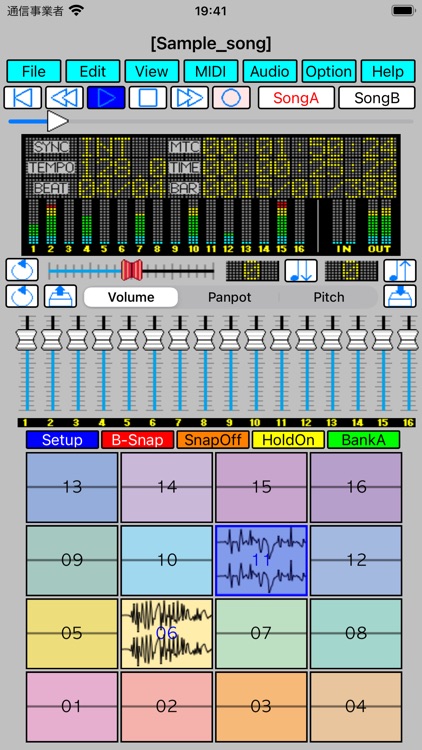
・It supports audio capture using the 16 pads on the iPhone or iPad's built-in microphone or audio interface, pad touch playback,
loop playback, and real-time recording of performances using pad and slider operations.
・You can freely paste phrases (MIDI, Audio) anywhere on the 32 multi-tracks to create music.
Supports inputting MIDI along with the wave, and recording voices and instrument performances along with MIDI.
・The recording function allows you to loop record between specified ranges, auto punch-in recording from a scheduled position,
simultaneous recording of MIDI and audio, and even recording tempo information while synchronizing with MIDI to an external device.
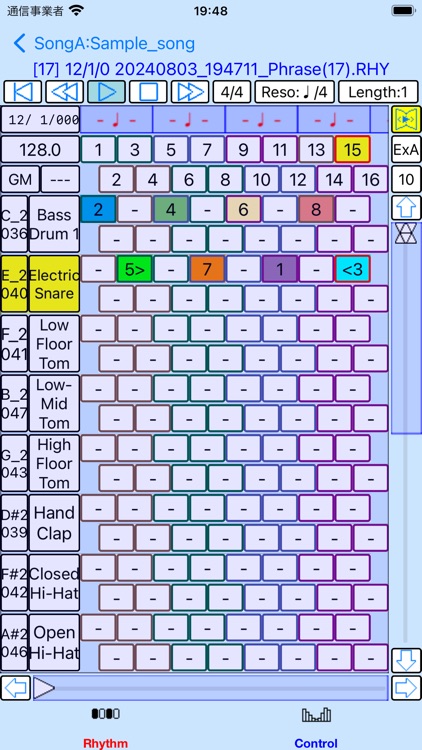
・ MIDI phrases support an editor that allows event input and editing using the Grid screen, Event List screen, Rhythm screen, and Chord screen.
The MIDI Control screen also supports event input during loop playback, and the import and editing of MIDI events by operating an external MIDI device.
・Audio phrases can be specified by selecting any section within a Wave file, or by editing a Wave file and specifying it as a phrase.
・Supports copying phrases between two songs.
You can import phrases from a song containing your favorite phrases to the song you're editing and paste them into a track.
・You can assign instruments (sound sources such as synthesizers) and effects from commercially available plug-ins (AudioUnit V3 compatible)
for iPhone and iPad to the Audio Mixer. In addition, it can also handle sound sources that use replaceable Sound Font (sf2) files,
so you can play back input MIDI data even without an external sound source.
・Audio phrases can be played back while controlling the volume, effects, etc. using the Audio Mixer.
・MIDI phrases can be output via MIDI to external MIDI devices, assigned AudioUnit V3 compatible instruments/MIDI Fx, and Sound Font (sf2) sound sources.
・Supports MIDI Router to control MIDI input and output. With MIDI Router, you can freely specify MIDI output for external MIDI devices,
AudioUnit V3-compatible instruments/MIDI Fx, and Sound Font (sf2) sound sources.
It also supports a MIDI monitor function that allows you to visually check the contents of MIDI input messages.
・It supports a viewer/controller that allows you to visually check MIDI playback messages and output MIDI events by tapping and swiping.
・The MIDI sound source supports GM, GM2, and Roland GS sound source standard tone lists and exclusive message libraries for controlling sound sources.
You can visually confirm what tones are used and controlled by commercially available SMF data for these sound source standards.
・By creating a PlayList, you can play multiple songs consecutively. Songs from this app, SMF, and Wave files can be registered in a PlayList.
・You can export the performance of audio phrases registered in a song or MIDI phrases output to a SoundFont source to a Wave file.
・Equipped with message recording, editing, and playback functions newly supported by the MIDI 2.0 standard.
・It supports the Trim function, which leaves only the specified range of a phrase on a track, and the Cut function,
which separates it into two phrases, just like editing on a tape.
You can easily change the structure of a song, such as placing another phrase in the middle of a phrase, without having to edit the detailed events within the phrase.
Disclaimer:
AppAdvice does not own this application and only provides images and links contained in the iTunes Search API, to help our users find the best apps to download. If you are the developer of this app and would like your information removed, please send a request to takedown@appadvice.com and your information will be removed.
AppAdvice does not own this application and only provides images and links contained in the iTunes Search API, to help our users find the best apps to download. If you are the developer of this app and would like your information removed, please send a request to takedown@appadvice.com and your information will be removed.
