You are using an outdated browser. Please
upgrade your browser to improve your experience.

WebEOC® Mobi 2 is brought to you by Intermedix®, the maker of WebEOC and the global leader in crisis incident management technology and solutions

WebEOC Mobi 2
by EMSystems, LLC


What is it about?
WebEOC® Mobi 2 is brought to you by Intermedix®, the maker of WebEOC and the global leader in crisis incident management technology and solutions. WebEOC Mobi 2 is a free mobile app that allows you to send a board entry from an iOS mobile device (iPad, iPhone etc.) to a display board in WebEOC.
App Screenshots

App Store Description
WebEOC® Mobi 2 is brought to you by Intermedix®, the maker of WebEOC and the global leader in crisis incident management technology and solutions. WebEOC Mobi 2 is a free mobile app that allows you to send a board entry from an iOS mobile device (iPad, iPhone etc.) to a display board in WebEOC.
Features:
WebEOC Mobi 2 can work offline (no cell or Internet connection) and then send board updates when connectivity is restored.
WebEOC Mobi 2 not only allows you to post new records, but it also allows you to update records previously posted from your device.
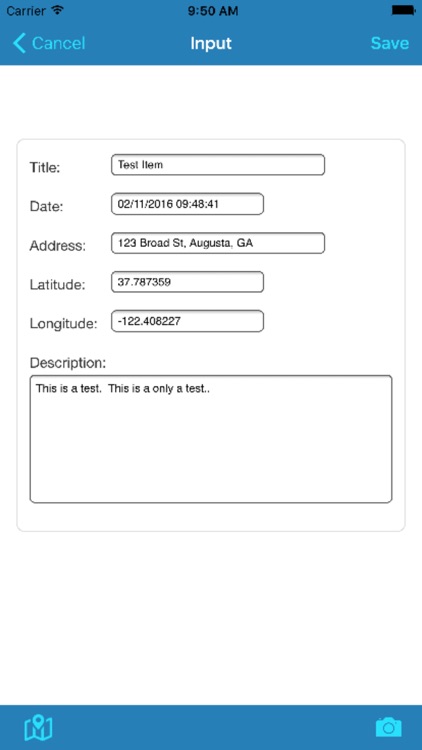
WebEOC Mobi 2 captures information from a single record to post to your WebEOC, including:
◾All the data fields that make up the input view.
◾Latitude and longitude (if Location Services are enabled).
◾Images (using either the device camera or Photo Library).
Prerequisites:
Your WebEOC Administrator must have already installed WebEOC version 7.8.0.4 and run one or more of the mobile form installers.
You will need the following information to complete the configuration of the Mobi app:
◾WebEOC URL
◾Username
◾Password
Disclaimer:
AppAdvice does not own this application and only provides images and links contained in the iTunes Search API, to help our users find the best apps to download. If you are the developer of this app and would like your information removed, please send a request to takedown@appadvice.com and your information will be removed.
AppAdvice does not own this application and only provides images and links contained in the iTunes Search API, to help our users find the best apps to download. If you are the developer of this app and would like your information removed, please send a request to takedown@appadvice.com and your information will be removed.
