You are using an outdated browser. Please
upgrade your browser to improve your experience.
The easiest way to transfer files between iPhones or with computers

WifiTransfer - wireless file transfer & mobile disk
by Notable Group


What is it about?
The easiest way to transfer files between iPhones or with computers!
App Details
Version
3.3
Rating
NA
Size
3Mb
Genre
Utilities Productivity
Last updated
October 26, 2014
Release date
January 24, 2014
WifiTransfer is FREE but there are more add-ons
-
$1.99
Upgrade to Full version
App Screenshots

App Store Description
The easiest way to transfer files between iPhones or with computers!
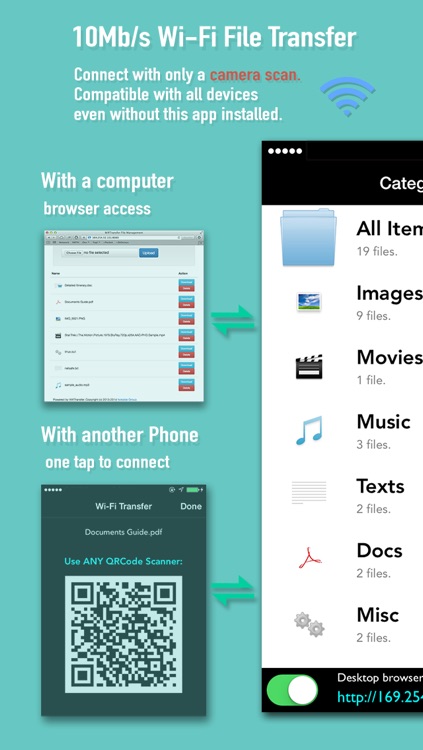
WifiTransfer enables fast wireless file transfer between iPhones or with computers with a simple scan.
► Up to 10MB/s wireless transfer with only one single scan
WifiTransfer enables simple and ultra fast file transfer between iPhones over Wi-Fi networks. Without any additional setup, just a QRCode scan will do.
► Manage iPhone files from desktop (locally or remotely)
In addition to transfer files between iPhone/iPad, you can also remotely manage files on your iPhone right from your desktop computer. Supported browsers: Safari, Chrome, FireFox, Internet Explorer
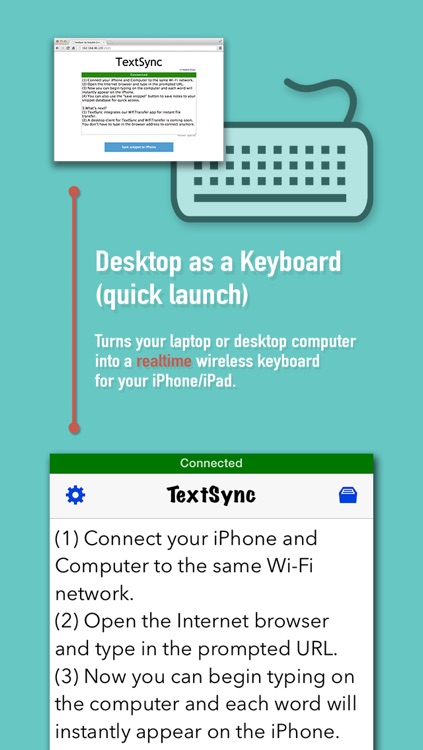
► Real time text typing
You can make any laptop or desktop computer as a wireless iPhone keyboard wherever you go. Each word you types on the computer will instantly appear on the iPhone.
► Compatible with ANY OTHER scanners
The target iPhone doesn't have to install WifiTransfer. An iPhone with an ARBITRARY scanner will do. (However, with WifiTransfer installed on the target iPhone, you will have better control on the transfer process.)
► Import files from various sources
You can import files either from other apps, over the internet, from local photo library or from Dropbox.
► Multiple File types support
The transferred items are classified automatically into 6 categories according to their type with database based search method.
JPEG, PNG, MOV, MP4, MP3, WAV, CAF, PDF Docs(.pdf), Text(.txt), RTF(.rtf), MS Word(.doc, .docx), MS Excel (.xls, .xlsx), MS PowerPoint(.ppt, .pptx), Pages(.pages), Numbers(.numbers), Keynote(.keynote), HTML(.html, .htm) and more.
► Built-in universal QR Scanner
The built-in scanner recognizes any type of Barcodes/QRCodes other than file QRCodes
► iTunes Synchronization
Of course it natively supports USB wired file transfer using iTunes.
► Responsive feedback
If you have any suggestion or recommendation about new features, please contact us:
notablefeedback@gmail.com
* How to use (iPhone/iPad to iPhone/iPad)
1) Make sure that the iPhones are connected to the same local network or the same Wi-Fi network.
2) Click the iPhone button beside a file
3) Scan the generated QRCode with the other iPhone and the transfer process starts
4) Transfer complete.
* How to use (iPhone and Computer)
1) Make sure that the iPhone and the computer are connected to the same local network or the same Wi-Fi network.
2) Click WiFi button and input the Device URL in Web Browser on your Desktop. (Or with our powerful desktop client, just a single camera scan will do.)
3) Download or upload files.
Disclaimer:
AppAdvice does not own this application and only provides images and links contained in the iTunes Search API, to help our users find the best apps to download. If you are the developer of this app and would like your information removed, please send a request to takedown@appadvice.com and your information will be removed.
AppAdvice does not own this application and only provides images and links contained in the iTunes Search API, to help our users find the best apps to download. If you are the developer of this app and would like your information removed, please send a request to takedown@appadvice.com and your information will be removed.
