You are using an outdated browser. Please
upgrade your browser to improve your experience.

Your Posture

Your Posture
by Gongxing Wu


What is it about?
Your Posture
App Store Description
Your Posture
http://www.youtube.com/v/mQSQ7WjbEGg&hl=en&fs=1
http://www.youtube.com/v/tpyYARAjwXU&hl=en&fs=1
http://www.buglesoft.com
Computer posture is important. You will probably spend many hours sitting at your Computer and how you do this will have implications on your health
Do you suffer from neck pain, a burning between your shoulder blades, lower back pain, headaches, digestive problems, breathing difficulties, eye strain? ... the list goes on.
All of the above could be related to how you sit at your computer for hours at a time every day, barely moving, eyes fixed on the screen with deadlines to meet.
---------------
If the iPhone is being held upright,it will report a small angle. When the iPhone is held at an angle of more than a certain degree for several seconds, you will get a sound alert. Adjust the iPhone to an angle of less than a certain degree , the alert sound will stop. Put your iPhone into your pocket or hang it around your neck and keep it upright, and you can start writing or typing something. If you hear the alert sound, just adjust your posture or give a sudden shake to stop it.
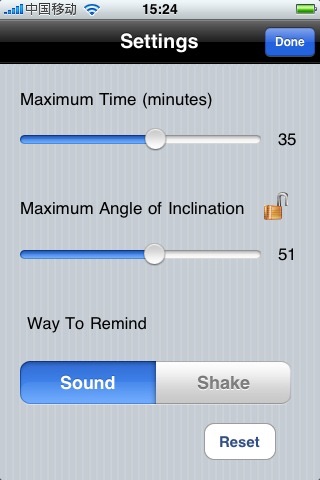
You can set the time spent sitting, and when it's time for you to get up and take a break ,the iPhone will vibrate for several seconds.
You can also specify the maximum angle of inclination. Enter the setting window, click the lock icon, you will see the current angle. If you like the current angle , just click lock icon again to save it. When the iPhone is held at an angle of more than the saved angle for several seconds, you will get a sound or vibrate alert.
The screen's backlight uses a lot of power, keeping it off as much as possible will extend battery life. the app allows you turn off the screen backlight when it's runing. click anywhere outside of the buttons to turn off the screen backlight ,click again to turn on.
You can also try my another app iPosture first. it's free version.
Learn more on http://www.buglesoft.com .
Disclaimer:
AppAdvice does not own this application and only provides images and links contained in the iTunes Search API, to help our users find the best apps to download. If you are the developer of this app and would like your information removed, please send a request to takedown@appadvice.com and your information will be removed.
AppAdvice does not own this application and only provides images and links contained in the iTunes Search API, to help our users find the best apps to download. If you are the developer of this app and would like your information removed, please send a request to takedown@appadvice.com and your information will be removed.
