
You are using an outdated browser. Please upgrade your browser to improve your experience.

Apps That
Went Free on
2020-06-15

Measure the distance between points, calculate from your keyboard, and enjoy a tour of the Solar System with today’s collection of apps.

Mini Calculator Keyboard - Pluskey
iPhone
iPad
Mini Calculator Keyboard - Pluskey

Mini Calculator Keyboard - Pluskey

Shira Shapira

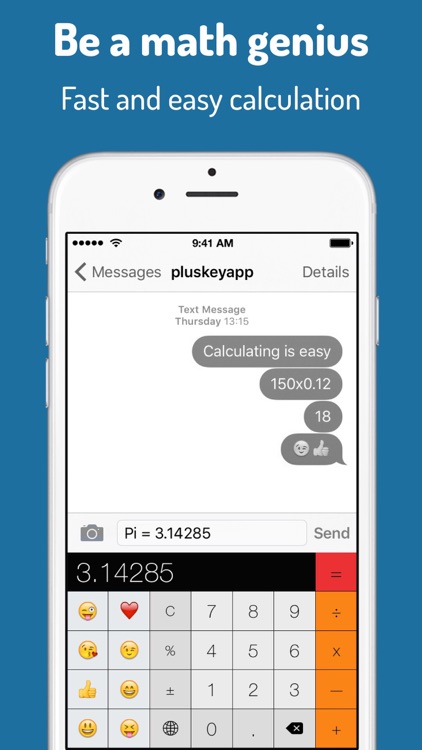
Calculate from your keyboard with Pluskey.

Anyone who wants convenient access to a calculator.

FREE ($0.99) For a limited time FREE ($0.99) For a limited time
Why we picked this?

The days of switching between apps to calculate are over. Pluskey puts a calculator right into your keyboard along with a few commonly used emojis. Your calculations will appear in a black bar just below the text field. Tap on the black bar to insert calculations at any time.

You frequently perform basic calculations.

You need a full-fledged solution.

Stellar Tour - AR Stargazer
iPhone
iPad
Stellar Tour - AR Stargazer

Stellar Tour - AR Stargazer

Aaron Day

Enjoy a tour of the Solar System with Stellar Tour.

The whole family.

FREE ($1.99) For a limited time FREE ($1.99) For a limited time
Why we picked this?

Stellar Tour isn’t just another star gazing app. It provides fascinating insights into the objects in our Solar System. You’re able to point your device at the night sky to see what’s in view, or you can search for specific stars, exoplanets, galaxies, and other galactic components. Tap on an object to learn about its properties and viewing times. The app also includes interactive models, educational videos, and fun facts.

You’re at all interested in astronomy.

You already have a go-to star gazing app.

Pin Points Distance Calculator
iPhone
iPad
Pin Points Distance Calculator

Pin Points Distance Calculator

Dennis Donner

Measure the distance between points with Pin Points.

Travelers.

$0.99 $0.99
Why we picked this?

Pin Points allows you to create trips with multiple waypoints. Each trip can include any number of points. You’re able to add points by your current location, dropping a pin on the map, or address. Points can also be deleted and reordered at any time. When you’re finished adding points, tap calculate and you’ll be presented with the distance and time it takes to travel to each point by air, foot, or car. Your’e also able to visualize your trip and access it offline.

You’re planning some summer travels.

You need points of interest.