You are using an outdated browser. Please
upgrade your browser to improve your experience.

[About iOS10

DocuWorks Folder
by Fuji Xerox Co., Ltd.

What is it about?
[About iOS10.3 Operation]
App Screenshots

App Store Description
[About iOS10.3 Operation]
If document with document name that contains accented characters (hereafter "corresponding characters") is sent from iTunes for Windows, operation for that document may not be performed correctly. Change the document name in Windows to avoid the corresponding characters and send the document. Even if document with document name that contains corresponding characters has been sent, if the document name has been changed to avoid the corresponding characters through iTunes for Windows operation, the document can be handled normally.
This is an application for carrying your DocuWorks files using iPhone/iPad/iPod touch. This allows you to download DocuWorks files and other files to view them and upload the files stored in the handheld device, from Fuji Xerox's cloud service "Working Folder", which supports document sharing.
DocuWorks files downloaded to the device can be opened with one tap by starting the Simple Viewer. You can also open DocuWorks files with one tap using the separate application DocuWorks Viewer Light 2.0 or later (separate installation required).
●With DocuWorks Folder, you can:
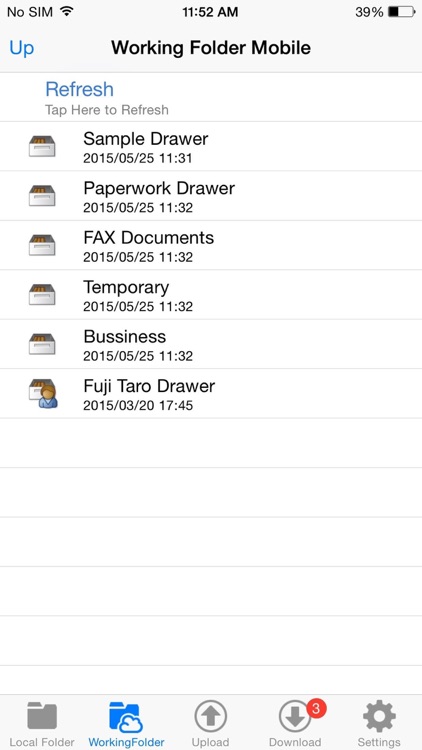
- View DocuWorks, PDF and image files with thumbnails by browsing the folders and files in Working Folder.
- Move and delete files in Working Folder, change file names and create folders.
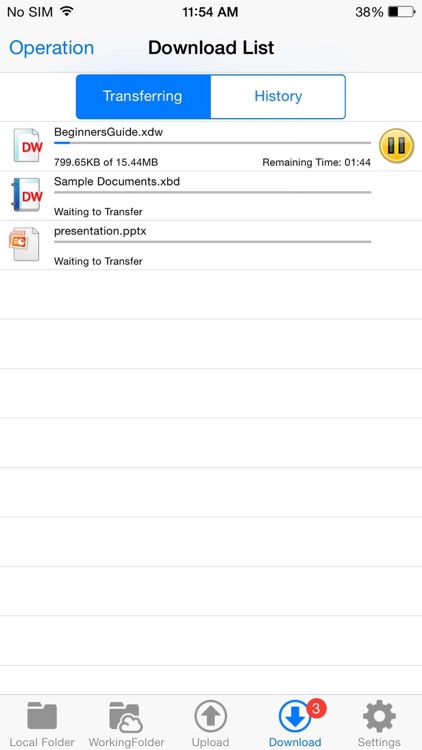
- Download files from Working Folder.
- Upload files to Working Folder
- Tap downloaded DocuWorks files once to display it with using Simple Viewer.
- Store the result with annotations edited by DocuWorks Viewer Light to Working Folder.
- Move and delete files in the device, change file names and create folders.
●Operating environments and specifications
- Supported OS: iOS 9.0, iOS 9.1, iOS 9.2, iOS 9.3, iOS 10.0, iOS 10.1, iOS 10.2 or iOS 10.3. or iOS 11.0.
- Supported models: iPad 2, iPad (3rd, 4thand 5th generation),iPhone 4S, iPhone 5, iPhone 5s, iPhone 5c, iPad mini, iPad mini 2, iPad mini3, iPad mini4, iPad Air, iPad Air 2, 9.7-inch iPad Pro,, 10.5-inch iPad Pro, iPhone 6, iPhone 6 Plus, iPhone 6s, iPhone 6s Plus, iPhone 7, iPhone 7 Plus, iPhone 8, iPhone 8 Plus or iPhone SE
●Required conditions to use Working Folder
- You must be registered as a user of Working Folder in advance. User registration cannot be performed from this application.
- The device can communicate with the server via internet using HTTPS protocol.
●What is Working Folder?
Working Folder is a storage area that can be used via internet provided as a service by Fuji Xerox. You can put files in Working Folder and take files from Working Folder through your Web browser, save the file scanned by a multifunction device to Working Folder and print the file in Working Folder using a multifunction device.
===========================
* For smooth operation of DocuWorks Folder, the following access permissions can be approved. Regarding Optional Permission, the service's basic features may be used even without approval.
Optional Permission
* Contacts: Permission needed to specify recipient e-mail addresses from your address book for Share Document feature
* Photos: Permission needed to import image and video files from your device and transfer them to Working Folder
Disclaimer:
AppAdvice does not own this application and only provides images and links contained in the iTunes Search API, to help our users find the best apps to download. If you are the developer of this app and would like your information removed, please send a request to takedown@appadvice.com and your information will be removed.
AppAdvice does not own this application and only provides images and links contained in the iTunes Search API, to help our users find the best apps to download. If you are the developer of this app and would like your information removed, please send a request to takedown@appadvice.com and your information will be removed.
