You are using an outdated browser. Please
upgrade your browser to improve your experience.
This MasterTracker app was designed to let you track whatever you want (Items)

MasterTracker
by James Ramey
What is it about?
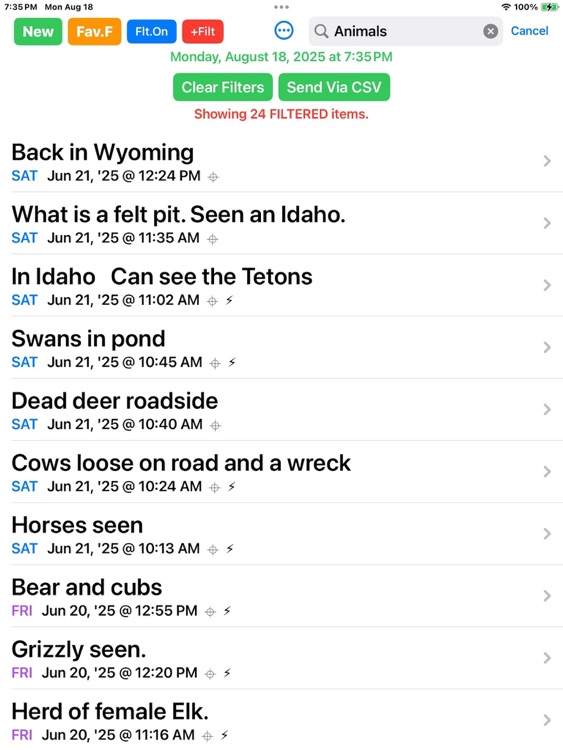
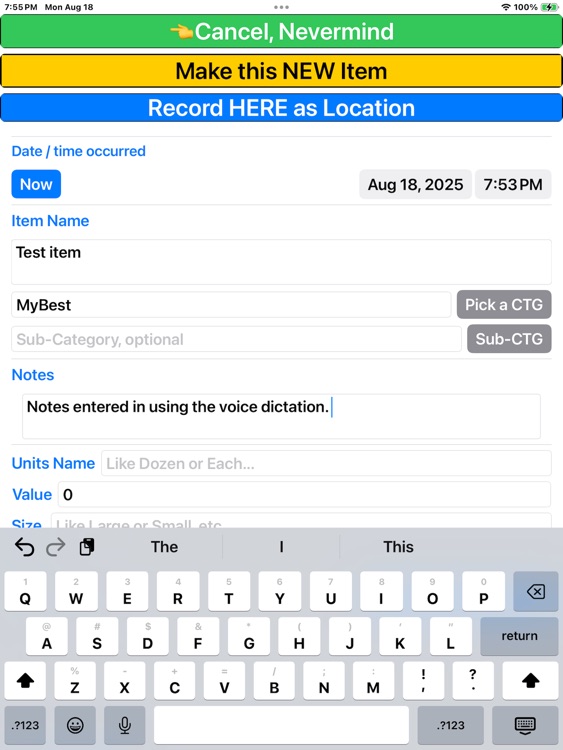
This MasterTracker app was designed to let you track whatever you want (Items). It records when, where (if wanted), what, how much, etc. and can: link to one of your contacts, show a map, add a pdf, add an image to the item. All the stuff you want to remember in one database spot, filterable so you can find what you want by just a piece of information on the item, like name or thing, or date or a catch phrase, city, date range, etc. You can dictate to it, Copy and paste in it, etc. All features are included with the one-time purchase. No WiFi needed except to see maps and get street address first time. (Location is obtained from GPS, not WiFi)
App Store Description
This MasterTracker app was designed to let you track whatever you want (Items). It records when, where (if wanted), what, how much, etc. and can: link to one of your contacts, show a map, add a pdf, add an image to the item. All the stuff you want to remember in one database spot, filterable so you can find what you want by just a piece of information on the item, like name or thing, or date or a catch phrase, city, date range, etc. You can dictate to it, Copy and paste in it, etc. All features are included with the one-time purchase. No WiFi needed except to see maps and get street address first time. (Location is obtained from GPS, not WiFi)
It was originally made for the patient to remember what treatments and pills, dosages, etc. were done when, and how they felt, and did various things. The treatments were extensive and overlapping and remembering all of the things going on was impossible, especially when feeling sick (Trust me, Cancer treatments put you in a fog). The notes App was not at all suitable to record things of when and where and then retrieve them later. This works easy, minimizes typing (I hate typing).
Basically, when you did something, anything, you wanted to remember, just enter it in, or, if a repeated item, just pick it and click it to clone as new with Now and Here added automatically. Enter in events, like “Took Kids to the Park”, or “Had radiation treatment one of seven”, “Felt Better today, able to walk to the park” (optional Emoji Icons are yours to choose from the keyboard). “First date with Pat, went to Sushi Place” Designed for clumsy fingers, weak typists, and set to avoid mistakes. It only requires two fields, an Item Name, and a date of when it happened (Defaults to now).
Helpful to record anything, from notes for a book, to things to ask somebody, to achievements, to the best place to catch fish and what conditions, etc. Can be used to track "Animals Seen" or the like and include the photo on the item so you will find it, where it was and when. Record events, milestones, feelings, ToDo's, Someday, Maybe stuff, ideas to examine later, Export the data to a standard CSV file for use in Excel, Numbers or Business Intelligence.
Other concerns, I never did like paying monthly for stuff. That is why this app stores everything on your device, no monthly subscriptions. Period. One button easy to back up the data to a standard csv file and put it in an email to who you want, then hit send.
The feature to link the contact to an item is great so you can put in notes and a photo, and pdf in the item and have it link to one of your contacts. the contact would have the person's name, address, phone, etc. and you can view inside MasterTracker.
Some uses: I made a Category (CTG) of “PutThing” and then enter in where I put that thing in my house or computer, etc. (and was never able to find because I put it someplace “Safe”). A category list gets made as you enter in a category and then you can pick it for a list rather than type it. (Also sub-category)
You can enter in old events, pick the date of it, and the location by finding on a Map in the MasterTracker, or entering an address. (it stores the GPS Latitude and Longitude then also finds and saves the written address). The GPS coordinates are entered when you save it as desired, if there is no WIFI, no problem. The written address can be updated later. https://TheMasterTracker.com
Most buttons, etc. in the app can be long pressed and help to get Help on that button or text.
Disclaimer:
AppAdvice does not own this application and only provides images and links contained in the iTunes Search API, to help our users find the best apps to download. If you are the developer of this app and would like your information removed, please send a request to takedown@appadvice.com and your information will be removed.
AppAdvice does not own this application and only provides images and links contained in the iTunes Search API, to help our users find the best apps to download. If you are the developer of this app and would like your information removed, please send a request to takedown@appadvice.com and your information will be removed.
