You are using an outdated browser. Please
upgrade your browser to improve your experience.

No more frustrating conference calls

Voxeet Conference Call
by Voxeet, Inc.


What is it about?
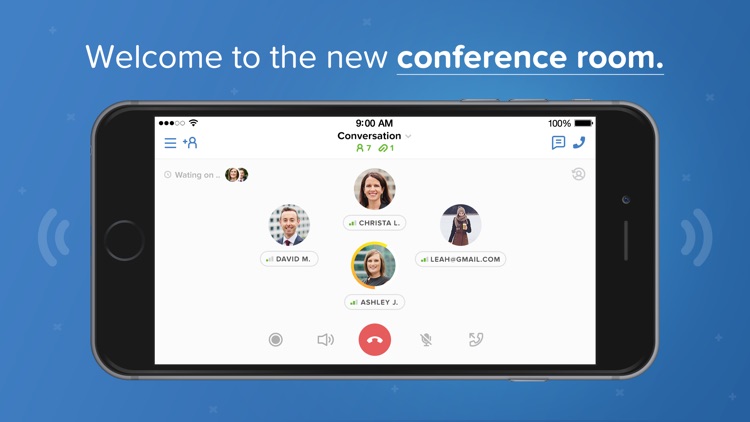
Voxeet Conference Call offers a variety of features to keep your conference calls simple and effective. You can have up to eight participants, share files, use the group chat, and have local dial-in numbers. The Whisper mode is great for two-way conversations and the guest login is ideal for a quick call.
Why we love it
For an easy-to-use conference call app with a good array of features, check out Voxeet Conference Call.
App Screenshots


App Store Description
No more frustrating conference calls! Start or join a call in one click, with our award-winning sound technology, flawless video, screen sharing, and audio recording.
Voxeet’s 3D surround sound recreates the natural feeling of being in the same room, so you get the most out of each meeting.
Get the most out of each business meeting, no matter where your team members are located. Unlike other conferencing apps (Hangouts, Duo, UberConference, GoToMeeting, Zoom, WeChat) Voxeet’s 3DHD surround sound lets your business move at the speed of sound. With Voxeet, the conference room is wherever you want it to be.
•Key Features•
• Best iPhone audio call quality on the market
• Conference with up to 8 audio participants for free (15 with Voxeet Pro)
• Guest login & one-click conference calling
• File sharing for PC & mobile
• Group chat and group call
• Easy scheduling
• Local dial-in numbers
• Private calling URLs
• Seamlessly transfer live calls from computer to smartphone to tablet
• Whisper mode: Hold private, two-way conversations during calls to optimize meeting time
• Place speakers anywhere within your virtual meeting room (left, center, right, close, or far)
• Multi-stream technology eliminates crosstalk and garbled voices to provide a “same-room” sensation
• Free mobile app & web app
• Video conference for up to 6 video participants with multiple layouts (Voxeet Pro)
• Screen sharing for Desktop (Voxeet Pro)
• Call recording & real-time replay (Voxeet Pro)
• Share presentation mode (Voxeet Pro)
• Dial-in options to support 40+ countries, including China (Voxeet Pro)
Follow us:
Twitter https://twitter.com/Voxeet
LinkedIn https://www.linkedin.com/company/voxeet
Facebook https://www.facebook.com/Voxeet
Disclaimer:
AppAdvice does not own this application and only provides images and links contained in the iTunes Search API, to help our users find the best apps to download. If you are the developer of this app and would like your information removed, please send a request to takedown@appadvice.com and your information will be removed.
AppAdvice does not own this application and only provides images and links contained in the iTunes Search API, to help our users find the best apps to download. If you are the developer of this app and would like your information removed, please send a request to takedown@appadvice.com and your information will be removed.
